This tutorial describes how to use SWTBot to write user interface tests for Eclipse plug-ins and RCP applications. It covers writing tests for menus, JFace tables and JFace trees and explains how to execute the tests with Maven Tycho.

1. User interface testing with SWTBot
SWTBot is an Eclipse project for testing the user interface of SWT-based applications. It provides an API that drives the user interface and lets you assert on its state.
SWTBot launches the application under test and then issues clicks, key strokes and queries against the live widgets.
1.1. Key classes
-
SWTBotis the base class for any SWT application, including Eclipse RCP applications. -
SWTWorkbenchBotextendsSWTBotwith API for the legacy Eclipse 3.x workbench and is only required for 3.x RCP applications or IDE plug-in tests.
1.2. How tests are launched
An SWTBot test runs in the same JVM as the application under test. You launch it as a JUnit Plug-in Test, which boots the OSGi runtime and starts your product before the test methods execute.
Two run configuration options decide how the test interacts with the UI:
-
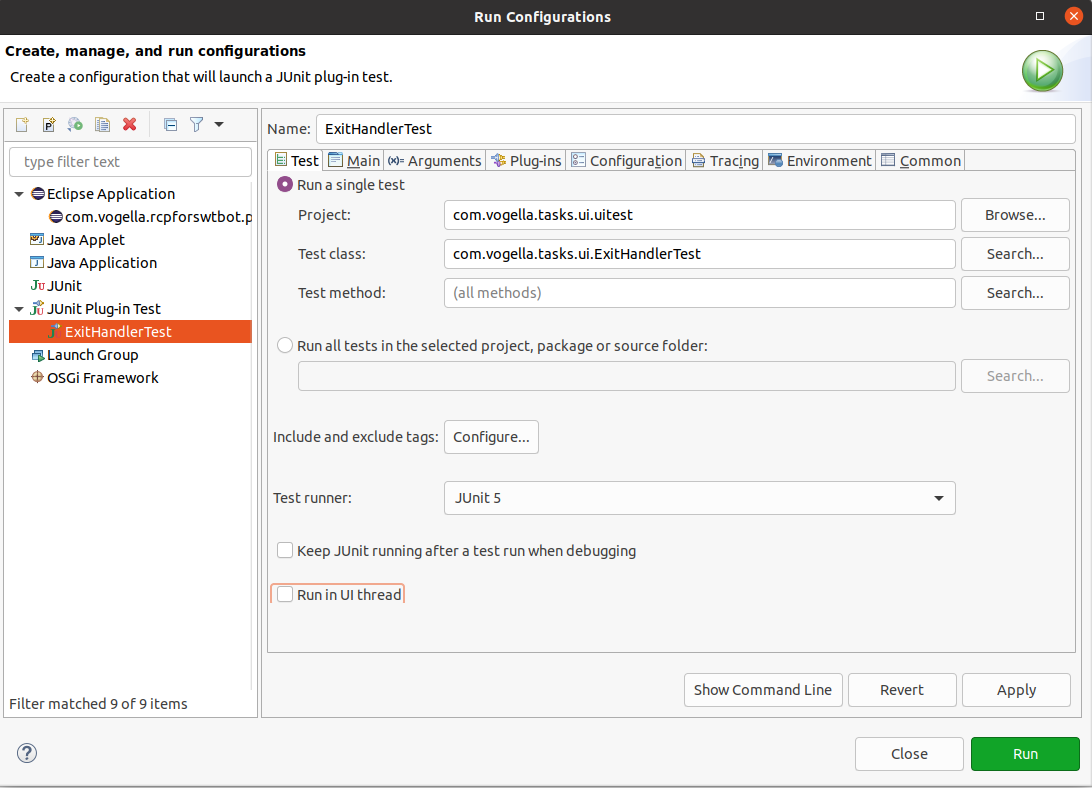
useUIHarness=trueboots the workbench. -
useUIThread=falseruns the test in a worker thread so it can post events to the UI thread.
Both flags must be set for SWTBot.
2. Installation of SWTBot
2.1. Install into the IDE
Install SWTBot via the Eclipse menu entry.
Enter the https://download.eclipse.org/technology/swtbot/releases/latest/ URL into the Work with: field.
Install the following features:
-
SWTBot for Eclipse Testing
-
SWTBot for SWT Testing
2.2. Add SWTBot to the target platform
For a command line build, add the following location to your target definition (.target) file so that SWTBot is available during the build.
<location includeAllPlatforms="false" includeConfigurePhase="true" includeMode="planner" includeSource="true" type="InstallableUnit">
    <repository location="https://download.eclipse.org/technology/swtbot/releases/latest/"/>
    <unit id="org.eclipse.swtbot.eclipse.feature.group"/>
    <unit id="org.eclipse.swtbot.e4.finder"/>
    <unit id="org.eclipse.swtbot.eclipse.test.junit.feature.group"/>
</location>
3. Prerequisites for this tutorial
This tutorial assumes that you have basic understanding of development for the Eclipse platform. Please see Eclipse RCP Tutorial or Eclipse plug-in Tutorial if you need any basic information.
4. Exercise: Write an SWTBot test for a generated RCP application
In this exercise, you write an SWTBot test using JUnit 5 for the com.example.e4.rcp RCP application.
It assumes that SWTBot is installed in your Eclipse IDE.
If you do not have such an application yet, create one via and name it com.example.e4.rcp.
Select Yes for the Would you like to create a rich client application? option, choose the Eclipse 4 RCP application template, and enable the Create sample content (parts, menu, etc.) flag on the last wizard page.
4.1. Create the test plug-in
Create a new plug-in named com.example.e4.swtbot.tests. Answer No when the wizard asks if you want to create a rich client application.
The .tests suffix lets Maven Tycho detect the project as a test plug-in.
|
Open the MANIFEST.MF file and add the following bundle dependencies:
-
org.eclipse.swt -
org.eclipse.jface -
org.eclipse.swtbot.swt.finder -
org.eclipse.swtbot.e4.finder -
org.slf4j.api -
com.example.e4.rcp
Also add the org.junit.jupiter.api package import.
The resulting MANIFEST.MF looks similar to the following.
Manifest-Version: 1.0
Bundle-ManifestVersion: 2
Bundle-Name: Swtbottests
Bundle-SymbolicName: com.example.e4.swtbot.tests
Bundle-Version: 1.0.0.qualifier
Import-Package: org.junit.jupiter.api;version="5.12.2"
Bundle-Vendor: EXAMPLE
Require-Bundle: org.eclipse.swt,
 org.eclipse.jface,
 org.eclipse.swtbot.e4.finder;bundle-version="4.3.0",
 org.eclipse.swtbot.swt.finder;bundle-version="4.3.0",
 org.slf4j.api;bundle-version="1.7.30",
 com.example.e4.rcp;bundle-version="1.0.0"
Automatic-Module-Name: com.example.e4.swtbottests
Bundle-RequiredExecutionEnvironment: JavaSE-21
4.2. Write the test
Create the following class. It clicks and verifies that the confirmation dialog appears, then dismisses it with Cancel.
package com.example.e4.swtbottests;

import static org.junit.Assert.assertNotNull;
import static org.junit.Assert.assertTrue;

import org.eclipse.swtbot.swt.finder.SWTBot;
import org.eclipse.swtbot.swt.finder.widgets.SWTBotButton;
import org.eclipse.swtbot.swt.finder.widgets.SWTBotMenu;
import org.eclipse.swtbot.swt.finder.widgets.SWTBotShell;
import org.junit.jupiter.api.BeforeEach;
import org.junit.jupiter.api.Test;

public class ExitHandlerTest {

    private static SWTBot bot;

    @BeforeEach
    public void beforeClass() throws Exception {
        // do not use SWTWorkbenchBot here which relies on Platform 3.x
        bot = new SWTBot();
    }

    @Test
    public void executeExit() {
        SWTBotMenu fileMenu = bot.menu("File");
        assertNotNull(fileMenu);
        SWTBotMenu exitMenu = fileMenu.menu("Quit");
        assertNotNull(exitMenu);
        exitMenu.click();

        SWTBotShell shell = bot.shell("Confirmation");
        SWTBot childBot = new SWTBot(shell.widget);
        SWTBotButton button = childBot.button("Cancel");
        assertTrue(button.isEnabled());
        button.click();
    }


//  @AfterEach
//  public void sleep() {
//      bot.sleep(2000);
//  }
}
4.3. Adjust the launch configuration
Right-click on the test class and select .
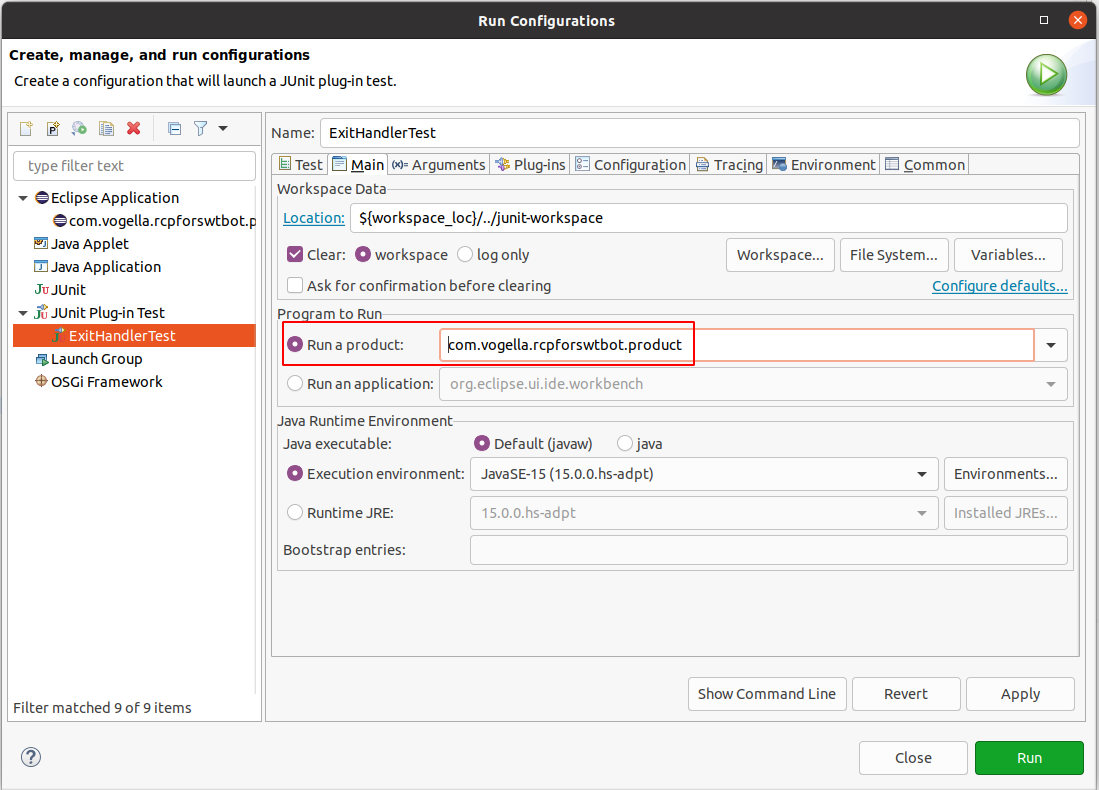
The first run typically fails, but it creates a launch configuration you can adjust. Open it via and select your test under JUnit Plug-in Test.
On the Main tab, choose your product under Run a product.
On the Test tab, configure SWTBot to run outside the UI thread.
4.4. Add build.properties entries for Tycho
Add the following entries to build.properties so that the same configuration is used during a Maven Tycho command line build.
pom.model.property.tycho.surefire.useUIHarness = true
pom.model.property.tycho.surefire.useUIThread = false
4.5. Validate
Run the test and verify that it passes. If your menu uses different text, adjust the strings in the test class until it runs successfully.
5. Exercise: Testing JFace tables and trees with SWTBot
JFace TableViewer and TreeViewer widgets are wrapped by SWTBotTable and SWTBotTree.
SWTBot can locate them by index, by header text or, much more robustly, by an SWTBot key set on the underlying widget.
This exercise extends the com.example.e4.rcp application with parts that show people in a table and teams in a tree, and then verifies them with SWTBot tests.
5.1. Why use an SWTBot widget key
Locating widgets by visible text breaks as soon as the UI text changes or another part on the same window shows a similar widget.
SWTBot supports a dedicated widget key, which is read by every *WithId finder method.
table.setData("org.eclipse.swtbot.widget.key", "personTable");You can then locate the table from a test via bot.tableWithId("personTable").
5.2. Add a JFace table part
Create a new part class PersonPart in com.example.e4.rcp and contribute it as part to your application model.
package com.example.e4.rcp.parts;

import java.util.List;

import jakarta.annotation.PostConstruct;

import org.eclipse.jface.viewers.ArrayContentProvider;
import org.eclipse.jface.viewers.ColumnLabelProvider;
import org.eclipse.jface.viewers.TableViewer;
import org.eclipse.jface.viewers.TableViewerColumn;
import org.eclipse.swt.SWT;
import org.eclipse.swt.layout.FillLayout;
import org.eclipse.swt.widgets.Composite;

public class PersonPart {

    public record Person(String firstName, String lastName) {}

    @PostConstruct
    public void createControls(Composite parent) {
        parent.setLayout(new FillLayout());

        TableViewer viewer = new TableViewer(parent,
                SWT.BORDER | SWT.FULL_SELECTION | SWT.H_SCROLL | SWT.V_SCROLL);
        viewer.getTable().setHeaderVisible(true);
        viewer.getTable().setLinesVisible(true);

        // SWTBot key so the test can locate this table reliably
        viewer.getTable().setData("org.eclipse.swtbot.widget.key", "personTable");

        createColumn(viewer, "First name", 150, Person::firstName);
        createColumn(viewer, "Last name", 150, Person::lastName);

        viewer.setContentProvider(ArrayContentProvider.getInstance());
        viewer.setInput(List.of(
                new Person("Lars", "Vogel"),
                new Person("Jonas", "Helming"),
                new Person("Dirk", "Fauth")));
    }

    private void createColumn(TableViewer viewer, String title, int width,
            java.util.function.Function<Person, String> mapper) {
        TableViewerColumn column = new TableViewerColumn(viewer, SWT.NONE);
        column.getColumn().setText(title);
        column.getColumn().setWidth(width);
        column.setLabelProvider(new ColumnLabelProvider() {
            @Override
            public String getText(Object element) {
                return mapper.apply((Person) element);
            }
        });
    }
}
5.3. Add the test for the table
Create the following test class in com.example.e4.swtbot.tests.
package com.example.e4.swtbot.tests;

import static org.junit.jupiter.api.Assertions.assertEquals;
import static org.junit.jupiter.api.Assertions.assertNotNull;

import org.eclipse.swtbot.swt.finder.SWTBot;
import org.eclipse.swtbot.swt.finder.widgets.SWTBotTable;
import org.eclipse.swtbot.swt.finder.widgets.SWTBotTableItem;
import org.junit.jupiter.api.BeforeEach;
import org.junit.jupiter.api.Test;

public class PersonTableTest {

    private SWTBot bot;

    @BeforeEach
    public void setUp() {
        bot = new SWTBot();
    }

    @Test
    public void tableContainsTheExpectedRows() {
        // locate the table by the SWTBot key set on the widget
        SWTBotTable table = bot.tableWithId("personTable");
        assertNotNull(table);
        assertEquals(3, table.rowCount(), "Person table should contain three rows");
        assertEquals("First name", table.columns().get(0));
        assertEquals("Last name", table.columns().get(1));
    }

    @Test
    public void canReadCellContent() {
        SWTBotTable table = bot.tableWithId("personTable");

        assertEquals("Lars", table.cell(0, 0));
        assertEquals("Vogel", table.cell(0, 1));
        assertEquals("Jonas", table.cell(1, "First name"));
    }

    @Test
    public void canSelectRowByLabel() {
        SWTBotTable table = bot.tableWithId("personTable");

        SWTBotTableItem item = table.getTableItem("Jonas");
        item.select();

        assertEquals(1, table.selectionCount());
        assertEquals("Jonas", table.selection().get(0, 0));
    }

    @Test
    public void doubleClickFiresOnTheCorrectRow() {
        SWTBotTable table = bot.tableWithId("personTable");

        table.doubleClick(2, 0);
        // assert here on the side effect of the double click in your part,
        // for example that a detail dialog opens via bot.shell("Person details").
    }
}
The test demonstrates the most common operations:
-
counting rows and column headers
-
reading cell values by column index or by header label
-
selecting a row by its first column text
-
triggering a double click on a specific cell
5.4. Add a JFace tree part
Create another part class TeamPart that shows teams and their members in a tree.
package com.example.e4.rcp.parts;

import java.util.List;

import jakarta.annotation.PostConstruct;

import org.eclipse.jface.viewers.ITreeContentProvider;
import org.eclipse.jface.viewers.LabelProvider;
import org.eclipse.jface.viewers.TreeViewer;
import org.eclipse.swt.SWT;
import org.eclipse.swt.layout.FillLayout;
import org.eclipse.swt.widgets.Composite;

public class TeamPart {

    public record Team(String name, List<String> members) {}

    @PostConstruct
    public void createControls(Composite parent) {
        parent.setLayout(new FillLayout());

        TreeViewer viewer = new TreeViewer(parent, SWT.BORDER | SWT.V_SCROLL);
        // SWTBot key so the test can locate this tree reliably
        viewer.getTree().setData("org.eclipse.swtbot.widget.key", "teamTree");

        viewer.setContentProvider(new ITreeContentProvider() {
            @Override
            public Object[] getElements(Object input) {
                return ((List<?>) input).toArray();
            }

            @Override
            public Object[] getChildren(Object parentElement) {
                if (parentElement instanceof Team team) {
                    return team.members().toArray();
                }
                return new Object[0];
            }

            @Override
            public Object getParent(Object element) {
                return null;
            }

            @Override
            public boolean hasChildren(Object element) {
                return element instanceof Team;
            }
        });

        viewer.setLabelProvider(new LabelProvider() {
            @Override
            public String getText(Object element) {
                if (element instanceof Team team) {
                    return team.name();
                }
                return String.valueOf(element);
            }
        });

        viewer.setInput(List.of(
                new Team("Platform", List.of("Lars", "Jonas")),
                new Team("Tycho", List.of("Christoph", "Mickael"))));
    }
}
5.5. Add the test for the tree
Create the following test class in com.example.e4.swtbot.tests.
package com.example.e4.swtbot.tests;

import static org.junit.jupiter.api.Assertions.assertEquals;
import static org.junit.jupiter.api.Assertions.assertNotNull;
import static org.junit.jupiter.api.Assertions.assertTrue;

import org.eclipse.swtbot.swt.finder.SWTBot;
import org.eclipse.swtbot.swt.finder.widgets.SWTBotTree;
import org.eclipse.swtbot.swt.finder.widgets.SWTBotTreeItem;
import org.junit.jupiter.api.BeforeEach;
import org.junit.jupiter.api.Test;

public class TeamTreeTest {

    private SWTBot bot;

    @BeforeEach
    public void setUp() {
        bot = new SWTBot();
    }

    @Test
    public void treeHasTwoTopLevelTeams() {
        SWTBotTree tree = bot.treeWithId("teamTree");
        assertNotNull(tree);
        assertEquals(2, tree.rowCount());
    }

    @Test
    public void canExpandTeamAndReadMembers() {
        SWTBotTree tree = bot.treeWithId("teamTree");

        SWTBotTreeItem platform = tree.expandNode("Platform");

        assertTrue(platform.isExpanded());
        assertEquals(2, platform.getItems().length);
        assertEquals("Lars", platform.getItems()[0].getText());
        assertEquals("Jonas", platform.getItems()[1].getText());
    }

    @Test
    public void canSelectChildNode() {
        SWTBotTree tree = bot.treeWithId("teamTree");

        tree.expandNode("Tycho").getNode("Mickael").select();

        assertEquals(1, tree.selectionCount());
        assertEquals("Mickael", tree.selection().get(0, 0));
    }
}
SWTBotTreeItem.expandNode expands the node and returns it for further navigation, so calls can be chained, for example tree.expandNode("Tycho").getNode("Mickael").select().
5.6. Validate
Add the new parts to the application model, run the application once manually to make sure the table and tree are visible, then execute the tests via .
6. More on SWTBot
6.1. Timeout
A UI interaction may take some time, for example when the application reads data. SWTBot waits 5 seconds by default before throwing an exception. You can change the timeout with the following snippet.
// Set the timeout to 6 seconds
SWTBotPreferences.TIMEOUT = 6000;
For details on the API see the SWTBot wiki.
| Testing an application with a login screen is not supported by SWTBot. See the SWTBot FAQ. |
6.2. Waiting for certain conditions
During UI tests some actions trigger long-running operations.
The test then needs to wait until the operation finishes.
For this case SWTBot provides the methods waitUntil, waitWhile and waitUntilWidgetAppears.
All these methods expect an instance of the ICondition interface that defines the condition to wait for.
The following snippet shows how to define a custom condition for waitUntil and waitWhile.
@Test
public void testPerspectiveChange() {

    final String adminPerspectiveId = "com.example.adminperspective";
    // wait until admin perspective becomes active
    bot.waitUntil(new DefaultCondition() {

        @Override
        public boolean test() throws Exception {
            return adminPerspectiveId.equals(this.modelService.getActivePerspective(this.window));
        }

        @Override
        public String getFailureMessage() {
            return adminPerspectiveId + " has not become active in time";
        }
    });

    final String mainPerspectiveId = "com.example.mainperspective";
    // alternatively wait as long as the main perspective is still active
    bot.waitWhile(new DefaultCondition() {

        @Override
        public boolean test() throws Exception {
            return mainPerspectiveId.equals(this.modelService.getActivePerspective(this.window));
        }

        @Override
        public String getFailureMessage() {
            return mainPerspectiveId + " remains active for too long";
        }
    });

    // ... continue testing the perspectives contents
}
Common conditions are predefined in the org.eclipse.swtbot.swt.finder.waits.Conditions class, for example to wait for a number of table rows.
@Test
public void testTableRowAmount() {

    SWTBotTable table = bot.table();
    int rowCount = 3;
    // choose a longer timeout than the default, because loading table contents takes longer
    int timeout = 10000;
    // check every second, if the condition is fulfilled
    int interval = 1000;
    bot.waitUntil(Conditions.tableHasRows(table, rowCount), timeout, interval);

    // ... continue working with the table rows
}
The Conditions class also provides methods that take an org.hamcrest.Matcher instance, for example to wait until a shell with a specific text opens.
@Test
public void testShellOpened() {
    // open a shell with "Shell text" as text...

    // create a shellMatcher to wait for the previously opened shell
    Matcher<Shell> shellMatcher = WithText.withTextIgnoringCase("Shell text");
    // wait until the shell is opened
    bot.waitUntil(Conditions.waitForShell(shellMatcher));
}
6.3. Waiting for background jobs
When you test the IDE, most operations continue in a background job after the UI call returns. Importing a project, building and refreshing a view all work this way, and a test that continues immediately sees a half finished state.
org.eclipse.swtbot.eclipse.finder.waits.Conditions extends the class above with a condition for exactly this case:
bot.waitUntil(Conditions.waitForJobs(null, "background jobs"));The first argument is the job family to wait for, the second a name used in the timeout message.
Passing null as the family waits for all jobs.
To wait for the workspace build only, use the families from ResourcesPlugin:
bot.waitUntil(Conditions.waitForJobs(ResourcesPlugin.FAMILY_AUTO_BUILD, "auto build"));Note that not every asynchronous update runs as a job.
Some parts refresh through Display.asyncExec or a delayed listener, and those finish after the job manager is already idle.
When a test depends on such a part, wait for the state you expect rather than for the jobs, for example until a tree shows the number of nodes you are after.
6.4. Checking whether a widget exists
A test that has to work against several releases sometimes needs to know whether a widget is there at all, for example a preference that only exists from a certain version on.
The finder methods are the wrong tool for this: they wait for the full SWTBotPreferences.TIMEOUT before failing.
Ask the finder directly instead.
It queries once and returns an empty list if nothing matches.
The matchers used below are static methods of org.eclipse.swtbot.swt.finder.matchers.WidgetMatcherFactory:
boolean available = !bot.getFinder()
        .findControls(allOf(widgetOfType(Button.class), withRegex(".*Unified Diff.*")))
        .isEmpty();
When you do want to wait, but for less than the global timeout, pass one explicitly instead of changing SWTBotPreferences.TIMEOUT and restoring it:
bot.waitUntil(Conditions.waitForWidget(withText("Finish")), 2000);6.5. Opening views and switching perspectives (3.x and IDE)
When you test the Eclipse IDE or a classic 3.x RCP application, SWTWorkbenchBot exposes direct API for views and perspectives.
Both look up the registration in the active IWorkbenchPage, so any view declared via the org.eclipse.ui.views extension point and any perspective declared via org.eclipse.ui.perspectives is reachable by its id.
Open or activate a view by id:
SWTWorkbenchBot bot = new SWTWorkbenchBot();

SWTBotView view = bot.viewById("org.eclipse.ui.navigator.ProjectExplorer");
view.show();
The id must match the id attribute on the <view> element in plugin.xml, not the visible label.
The method throws WidgetNotFoundException if no view with that id is registered.
If the view is not currently open, show() opens it; if it is already open, show() activates it.
Alternatively, locate a view by its visible part name:
bot.viewByPartName("Project Explorer").show();Switch the active perspective by id or by label:
bot.perspectiveById("org.eclipse.jdt.ui.JavaPerspective").activate();
// or, when the id is not stable across releases
bot.perspectiveByLabel("Java").activate();
activate() performs the switch and opens the perspective if it is not yet open in the current window.
To restore the perspective to its initial layout between tests, use:
bot.resetActivePerspective();6.6. Opening views and switching perspectives (Eclipse 4 RCP)
Eclipse 4 RCP applications have no IWorkbenchPage, and SWTBot (the E4 base class) therefore offers no viewById or perspectiveById.
Views and perspectives are entries in the application model (MPart, MPerspective), not extension point contributions.
For tests, there are two practical approaches.
Drive the application’s own menu. If the application contributes a menu that opens parts or switches perspectives, drive it like any other menu. The exact menu path depends on what is in the application model:
SWTBot bot = new SWTBot();
bot.menu("Window").menu("Show View").menu("Other...").click();
SWTBotShell shell = bot.shell("Show View");
shell.activate();
bot.tree().expandNode("General").select("Project Explorer");
bot.button("Open").click();
Use the E4 services directly.
For programmatic switching that does not depend on menus, inject EPartService, EModelService and MApplication into a test helper and call their API directly:
@Inject
EPartService partService;

@Inject
EModelService modelService;

@Inject
MApplication application;

// ... inside a method
partService.showPart("com.example.e4.rcp.part.person", PartState.ACTIVATE);

MPerspective perspective = modelService
        .findElements(application, "com.example.e4.rcp.perspective.main", MPerspective.class, null)
        .get(0);
partService.switchPerspective(perspective);
This is regular E4 platform API rather than SWTBot, but it composes well with SWTBot tests because both run in the same JVM as the application.
6.7. Locate widgets by SWTBot key
Locating widgets by visible text is fragile, because the text changes between languages and releases. Set a stable SWTBot key on the widget instead:
text.setData("org.eclipse.swtbot.widget.key", "username");In the test, use any of the *WithId finder methods:
SWTBotText username = bot.textWithId("username");This pattern works for every SWT widget that SWTBot supports, including tables and trees as shown in the table and tree exercise.
7. Possible pitfalls with SWTBot
This section contains possible pitfalls, which might come up when implementing SWTBot tests.
7.1. Menu entries keep their ellipsis
bot.menu(String) matches the label exactly, apart from the mnemonic marker &.
Trailing dots are part of the label, so menu("Preferences") finds nothing while menu("Preferences…") works.
This bites in particular because such labels change between releases: Eclipse renamed Window > Preferences to Preferences… in 2025-06.
To survive the rename, match with a pattern instead.
SWTBotMenu and SWTBotRootMenu both offer an overload that takes a matcher, a flag whether to search recursively, and the index of the match to use:
bot.menu("Window").menu(withRegex("Preferences.*"), false, 0).click();7.2. Decorations break exact tree matching
SWTBotTree.getTreeItem(String) and expandNode(String…) match the label exactly, and there is no matcher overload.
Labels in the IDE are decorated, however.
With EGit installed a project appears as com.example.core [my-repo main], and a file with unstaged changes gets a > in front of its name.
An exact lookup for com.example.core fails, and it fails again after every change of the decoration.
Read the labels and pick the one you want:
for (SWTBotTreeItem item : bot.tree().getAllItems()) {
    if (item.getText().startsWith("com.example.core")) {
        item.select();
        break;
    }
}
SWTBotTreeItem.getNodes() does the same for children.
Include the labels you found in the failure message of your helper, otherwise a decoration change looks like a missing element.
7.3. Typing into a Java editor corrupts the source
SWTBotEclipseEditor.typeText simulates keystrokes, and the Java editor reacts to them.
Typing println("Hello") leaves println("Hello")") behind, because the editor closed the quote and the bracket for you.
The test then fails somewhere else entirely, with an error that says nothing about typing.
insertText(int line, int column, String text) writes into the document and triggers no auto edit:
editor.insertText(5, 0, "System.out.println(\"Hello\");");Use typeText when the auto edit behaviour is what you are testing, and insertText in every other case.
7.4. Parts that follow the selection lag behind
Moving the caret with SWTBotEclipseEditor.navigateTo(line, column) does not immediately update the parts that follow it.
The Outline view for instance keeps showing the previously selected element for a while, because it refreshes through its own listener rather than as part of the call.
A screenshot or an assertion taken right afterwards sees whichever state happened to be current.
Adding setFocus() does not help: navigateTo already calls it internally, right after waitForEnabled().
Waiting for jobs does not help either, because the refresh does not run as a job.
Wait for the state you expect instead:
editor.navigateTo(0, 0);

SWTBotTree outline = bot.viewById("org.eclipse.ui.views.ContentOutline").bot().tree();
bot.waitUntil(new DefaultCondition() {
    @Override
    public boolean test() {
        return outline.selection().get(0, 0).contains("com.example.demo");
    }

    @Override
    public String getFailureMessage() {
        return "The Outline did not follow the caret";
    }
});
Reading the selection does not move the focus, so the part is captured as it is drawn. Be aware that such a part can also settle on the wrong element and stay there, so give the wait a timeout you are willing to fail on.
7.5. The test workspace inherits its surroundings
Tycho places the test workspace in target/work/data by default.
If your checkout is inside a Git repository, that workspace is inside it too, and EGit adds the surrounding repository to the Git Repositories view.
A test then sees the developer’s own repository, with their name and their uncommitted changes.
Point the workspace somewhere outside the working tree:
<osgiDataDirectory>${java.io.tmpdir}/my-tests-workspace</osgiDataDirectory>
<deleteOsgiDataDirectory>true</deleteOsgiDataDirectory>
The same applies to anything else the IDE picks up from its environment, such as a ~/.gitconfig that sets a user name.
7.6. Accessing a Link and clicking on it
First of all define an org.eclipse.swt.widgets.Link to be tested in the UI code.
Link link = new Link(parent, SWT.NONE);
// add the <a> tags to visualize a underlined clickable blue hyperlink
link.setText("<a>www.vogella.com</a>");
link.addSelectionListener(new SelectionAdapter() {
    @Override
    public void widgetSelected(SelectionEvent e) {
        // ... open browser and go to vogella.com
    }
});
The text applied to the Link is <a>www.vogella.com</a>, but in the UI you will see this:

When this Link is accessed by SWTBot using the text of the Link, the literal <a>www.vogella.com</a> has to be used.
// even though only www.vogella.com is shown in the UI this won't work
SWTBotLink vogellaLink = bot.link("www.vogella.com");

// this is the valid way to access the Link
SWTBotLink vogellaLink = bot.link("<a>www.vogella.com</a>");
Another pitfall with SWTBotLink is that invoking click() might not work properly.
SWTBotLink therefore provides an overloaded click(String hyperlinkText) method that takes the hyperlink text as a parameter.
SWTBotLink vogellaLink = bot.link("<a>www.vogella.com</a>");
// explicitly specify where to click on
vogellaLink.click("www.vogella.com");
Always prefer click(String hyperlinkText) over the no-argument click() method.
8. Running SWTBot tests with Maven Tycho
Maven Tycho can run the SWTBot tests written in the previous exercises as part of a regular mvn verify build, both locally and on a CI server.
This section walks through the required configuration.
8.1. How Tycho runs SWTBot
Tycho discovers test plug-ins by the eclipse-test-plugin packaging and executes them with the tycho-surefire-plugin.
For SWTBot the plugin must be configured to start the workbench and to run the tests outside the UI thread, the same two settings that you set in the IDE launch configuration.
| Property | Required value | Reason |
|---|---|---|
|
|
Boots the workbench so widgets exist. |
|
|
Lets the test thread post events to the UI thread. |
|
your product id |
The product to start before the tests run. |
|
|
Required for Eclipse 4 RCP applications. |
8.2. Add SWTBot to the target platform
Reference the SWTBot p2 repository from your target file so that the test plug-in resolves at build time.
<?xml version="1.0" encoding="UTF-8" standalone="no"?>
<?pde version="3.8"?>
<target name="com.example.e4.target">
    <locations>
        <location includeAllPlatforms="false" includeConfigurePhase="true"
                  includeMode="planner" includeSource="true" type="InstallableUnit">
            <repository location="https://download.eclipse.org/releases/latest/"/>
            <unit id="org.eclipse.e4.rcp.feature.group" version="0.0.0"/>
            <unit id="org.eclipse.equinox.event" version="0.0.0"/>
        </location>

        <location includeAllPlatforms="false" includeConfigurePhase="true"
                  includeMode="planner" includeSource="true" type="InstallableUnit">
            <repository location="https://download.eclipse.org/technology/swtbot/releases/latest/"/>
            <unit id="org.eclipse.swtbot.eclipse.feature.group" version="0.0.0"/>
            <unit id="org.eclipse.swtbot.e4.finder" version="0.0.0"/>
            <unit id="org.eclipse.swtbot.eclipse.test.junit.feature.group" version="0.0.0"/>
        </location>
    </locations>
</target>
The org.eclipse.equinox.event unit is included because Eclipse 4 needs it at runtime, but it is sometimes not pulled in automatically by SWTBot tests.
8.3. Parent pom
The parent pom enables Tycho, declares the target platform and adds org.eclipse.equinox.event as an extra requirement during dependency resolution.
<?xml version="1.0" encoding="UTF-8"?>
<project xmlns="http://maven.apache.org/POM/4.0.0"
         xmlns:xsi="http://www.w3.org/2001/XMLSchema-instance"
         xsi:schemaLocation="http://maven.apache.org/POM/4.0.0 http://maven.apache.org/xsd/maven-4.0.0.xsd">

    <modelVersion>4.0.0</modelVersion>
    <groupId>com.example.e4</groupId>
    <artifactId>com.example.e4.releng</artifactId>
    <version>1.0.0-SNAPSHOT</version>
    <packaging>pom</packaging>

    <properties>
        <tycho.version>4.0.10</tycho.version>
    </properties>

    <modules>
        <module>../com.example.e4.rcp</module>
        <module>../com.example.e4.swtbot.tests</module>
    </modules>

    <build>
        <plugins>
            <plugin>
                <groupId>org.eclipse.tycho</groupId>
                <artifactId>tycho-maven-plugin</artifactId>
                <version>${tycho.version}</version>
                <extensions>true</extensions>
            </plugin>

            <plugin>
                <groupId>org.eclipse.tycho</groupId>
                <artifactId>target-platform-configuration</artifactId>
                <version>${tycho.version}</version>
                <configuration>
                    <environments>
                        <environment>
                            <os>linux</os><ws>gtk</ws><arch>x86_64</arch>
                        </environment>
                        <environment>
                            <os>win32</os><ws>win32</ws><arch>x86_64</arch>
                        </environment>
                        <environment>
                            <os>macosx</os><ws>cocoa</ws><arch>x86_64</arch>
                        </environment>
                    </environments>

                    <dependency-resolution>
                        <extraRequirements>
                            <!-- Required for SWTBot tests on Eclipse 4 -->
                            <requirement>
                                <type>eclipse-plugin</type>
                                <id>org.eclipse.equinox.event</id>
                                <versionRange>0.0.0</versionRange>
                            </requirement>
                        </extraRequirements>
                    </dependency-resolution>
                </configuration>
            </plugin>
        </plugins>
    </build>
</project>
8.4. Test plug-in pom
The test plug-in uses the eclipse-test-plugin packaging and configures tycho-surefire-plugin to start the product with the UI harness.
<?xml version="1.0" encoding="UTF-8"?>
<project xmlns="http://maven.apache.org/POM/4.0.0"
         xmlns:xsi="http://www.w3.org/2001/XMLSchema-instance"
         xsi:schemaLocation="http://maven.apache.org/POM/4.0.0 http://maven.apache.org/xsd/maven-4.0.0.xsd">

    <modelVersion>4.0.0</modelVersion>
    <parent>
        <groupId>com.example.e4</groupId>
        <artifactId>com.example.e4.releng</artifactId>
        <version>1.0.0-SNAPSHOT</version>
        <relativePath>../com.example.e4.releng/pom.xml</relativePath>
    </parent>

    <artifactId>com.example.e4.swtbot.tests</artifactId>
    <packaging>eclipse-test-plugin</packaging> (1)

    <build>
        <plugins>
            <plugin>
                <groupId>org.eclipse.tycho</groupId>
                <artifactId>tycho-surefire-plugin</artifactId>
                <version>${tycho.version}</version>
                <configuration>
                    <useUIHarness>true</useUIHarness>      (2)
                    <useUIThread>false</useUIThread>       (3)
                    <product>com.example.e4.rcp.product</product>
                    <application>org.eclipse.e4.ui.workbench.swt.E4Application</application>
                    <dependencies>
                        <dependency>
                            <type>p2-installable-unit</type>
                            <artifactId>org.eclipse.swtbot.e4.finder</artifactId>
                        </dependency>
                    </dependencies>
                </configuration>
            </plugin>
        </plugins>
    </build>
</project>| 1 | Packaging eclipse-test-plugin makes Tycho execute the tests in this module. |
| 2 | useUIHarness=true starts the workbench, which is required for SWT widgets. |
| 3 | useUIThread=false runs the test in a worker thread so SWTBot can post events to the UI thread. |
8.5. build.properties shortcut
Instead of writing a custom pom for every test plug-in, you can use pomless Tycho builds and configure the two surefire properties from build.properties directly:
pom.model.property.tycho.surefire.useUIHarness = true
pom.model.property.tycho.surefire.useUIThread = false
This is enough for a basic setup and keeps the pom files free of SWTBot specific configuration.
8.6. Run the build
Execute the build from the parent module.
mvn clean verifyTycho resolves the target platform, builds the product, builds the test plug-in and finally starts the product to run the SWTBot tests.
A failing SWTBot test produces a screenshot in the screenshots directory of the test plug-in, see the next section for details.
8.7. Running headless
On a machine without a display, wrap the command with xvfb-run so a virtual display is available.
Three details decide whether the run behaves like a real desktop.
env -u WAYLAND_DISPLAY -u XDG_SESSION_TYPE GDK_BACKEND=x11 \
  xvfb-run -a --server-args="-screen 0 1920x1080x24" \
  bash -c 'metacity --sm-disable --replace >/dev/null 2>&1 & sleep 3; mvn clean verify'
Start a window manager.
A bare Xvfb has none, which you can verify with xprop -root _NET_SUPPORTING_WM_CHECK: without a window manager the property does not exist.
Nothing then activates, maximises or stacks windows, so bot.activeShell() can return null and maximize() has no effect.
The SWTBot build itself starts metacity inside its virtual display for this reason.
Do not expect a window manager to fix every timing problem, though. Parts that update through a delayed listener rather than through focus, the Outline view for instance, are just as unreliable with one as without.
Give the display more room than the window needs, and pin the colour depth.
The xvfb-run default screen is small and, depending on the distribution, only 8 bit deep.
A workbench window sized beyond the screen is clipped, and a reduced colour depth changes the pixels, which matters as soon as a test compares screenshots.
On Wayland, pin the toolkit to X11.
Plain xvfb-run on a Wayland session renders on the real compositor instead of the virtual display, so the run is not headless at all.
GDK_BACKEND=x11 redirects GTK, but not AWT.
When a test fails, SWTBot forks a plain JVM that calls java.awt.Robot for the failure screenshot, and with the Wayland variables still set that fork goes through the desktop portal and opens a screen sharing dialog that blocks the build.
Unsetting WAYLAND_DISPLAY and XDG_SESSION_TYPE makes AWT fall back to the Xvfb display.
9. Screenshots on failure
SWTBot can capture a screenshot of the running application whenever a test fails.
For JUnit 5 register the SWTBot extension on the test class.
Add a dependency on the org.eclipse.swtbot.junit5 plug-in, then annotate the test class as follows:
import org.eclipse.swtbot.swt.finder.junit5.SWTBotJunit5Extension;
import org.junit.jupiter.api.extension.ExtendWith;

@ExtendWith(SWTBotJunit5Extension.class)
public class ExitHandlerTest {
    // tests
}
Screenshots are written to the screenshots folder of the test project.
If the folder is not visible in the IDE, refresh the project with F5.
You can also trigger a screenshot from code, for example before tearing down a complex setup:
bot.captureScreenshot("after-login.png");9.1. Capturing a single widget
bot.captureScreenshot records the whole display.
To capture one part of the application, org.eclipse.swtbot.swt.finder.utils.SWTUtils offers two more variants:
SWTUtils.captureScreenshot("explorer.png", control);
SWTUtils.captureScreenshot("area.png", new Rectangle(0, 0, 800, 600));
The Control of a view or editor comes from getWidget(), which every SWTBotWorkbenchPart provides:
SWTBotView view = bot.viewById("org.eclipse.ui.navigator.ProjectExplorer");
view.show();
SWTUtils.captureScreenshot("explorer.png", (Control) view.getWidget());
For any other widget, AbstractSWTBot exposes the wrapped widget as the public field widget.
A Shell is treated differently from other controls: the capture includes the window frame drawn by the window manager.
On a virtual display without a window manager there is no frame, so the border of such a screenshot contains whatever was left in that memory.
This is one more reason to start a window manager for headless runs.
All three methods write a PNG file and return boolean.
There is no variant that returns the image, so a test that wants to compare images has to read the file back.
10. Learn more and get support
This tutorial continues on Eclipse RCP online training or Eclipse IDE extensions with lots of video material, additional exercises and much more content.
11. SWTBot Resources
11.1. vogella Java example code
If you need more assistance we offer Online Training and Onsite training as well as consulting


