This tutorial gives an overview of OSGi and its modularity layer using Eclipse Equinox.

1. Introduction to software modularity with OSGi
OSGi is a set of specifications. Its core specification defines a component and service model for Java applications.
A software component in OSGi is called bundle or plug-in, both terms are interchangeable. Services are Java implementations that OSGi allows you to start and access.
An application consists of different components and services. A solid and clean software architecture consists of components that can change their internal implementation without affecting other components. OSGi supports creating such an architecture.
The OSGi specification defines a way for plug-ins to define:
-
their API
-
their dependencies
-
provided and required services
A plug-in is therefore a cohesive, self-contained unit that explicitly defines its dependencies on other components and services.
OSGi defines that plug-ins and services can be dynamically installed, activated, deactivated, updated and uninstalled.
The OSGi specification has several implementations, for example Eclipse Equinox, Knopflerfish OSGi or Apache Felix.
Eclipse Equinox is the reference implementation of the base OSGi specification. It is also the runtime environment on which Eclipse applications are based.
|
Java 9 provides its own module system to describe software component dependencies, but it has not yet been adopted by the Eclipse module system. |
2. OSGi configuration files
2.1. The manifest file (MANIFEST.MF)
OSGi uses the META-INF/MANIFEST.MF file (called the manifest file) from the standard Java specification to define its metadata. The Java specification defines that additional key-value pairs can be added to this file without affecting runtimes which do not understand these key-value combinations. Therefore, OSGi plug-ins can be used without restrictions in other Java environments.
The following listing is an example for a manifest file containing OSGi metadata.
Manifest-Version: 1.0
Bundle-ManifestVersion: 2
Bundle-Name: Popup Plug-in
Bundle-SymbolicName: com.example.myosgi; singleton:=true
Bundle-Version: 1.0.0
Bundle-Activator: com.example.myosgi.Activator
Require-Bundle: org.eclipse.ui,
 org.eclipse.core.runtime
Bundle-ActivationPolicy: lazy
Bundle-RequiredExecutionEnvironment: JavaSE-21
The following table gives an overview of the OSGi metadata used in the manifest file.
| Identifier | Description |
|---|---|
Bundle-Name |
Short description of the plug-in. |
Bundle-SymbolicName |
The unique technical name of the plug-in.
If this plug-in is providing an extension or an extension point it must be marked as Singleton.
You do this by adding the following statement after the Bundle-SymbolicName identifier:
|
Bundle-Version |
Defines the plug-in version and must be incremented if a new version of the plug-in is published. |
Bundle-Activator |
Defines an activator class that implements the |
Bundle-RequiredExecutionEnvironment (BREE) |
Specify which Java version is required to run the plug-in. If this requirement is not fulfilled, then the runtime does not load the plug-in. The OSGi specification deprecates it, but the Eclipse Plug-in development tooling still uses it, hence this is also used in this description. |
Bundle-ActivationPolicy |
Setting this to lazy instructs the OSGi runtime that this plug-in should be activated if one of its classes and interfaces are used by other plug-ins. Must be in Equinox if the plug-in provides services. |
Bundle-ClassPath |
The Bundle-ClassPath specifies where to load classes from the bundle.
The default is |
2.2. Unique identifier for plug-ins
The combination of Bundle-SymbolicName and Bundle-Version uniquely identifies a plug-in.
Each plug-in has a unique name (id) that is defined via the Bundle-SymbolicName property.
By convention, this name uses the reverse domain name of the plug-in author.
For example, if you own the "example.com" domain then the symbolic name would start with "com.example".
Each plug-in defines its version number in the Bundle-Version property.
OSGi recommends to use the following schema for versions in the Bundle-Version field identifier.
<major>.<minor>.<patch/service>
If you change your plug-in code you increase the version according to the following rule set.
-
<major> is increased if changes are not backwards compatible.
-
<minor> is increased if public API has changed but all changes are backwards compatible.
-
<service> is increased if all changes are backwards compatible.
For more information on this version scheme see the Version Numbering Wiki.
3. Specifying the API of a plug-in and its dependencies
An OSGi runtime restricts access to classes from other plug-ins. To access classes from other plug-ins, a plug-in needs to define dependencies to these plug-ins or their packages. In addition, the plug-in must define the used packages as API.
The only exception are packages from the Java runtime environment that can be accessed by default.
All these restrictions are enforced via a specific OSGi classloader.
Each plug-in has its own classloader.
Access to restricted classes is not possible without using reflection.
|
Unfortunately, OSGi cannot prevent you from using Java reflection to access these classes. This is because OSGi is based on the Java runtime that does not yet support a modularity layer. |
3.1. Defining the API of a plug-in
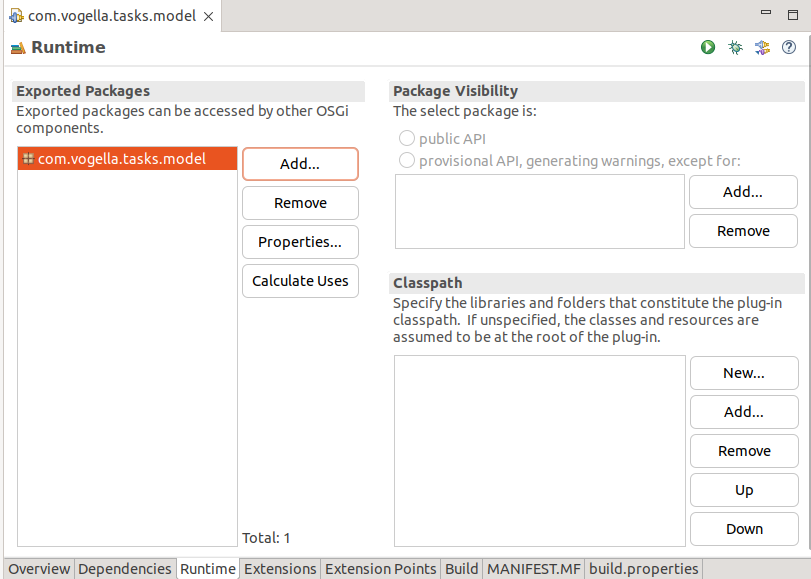
A plug-in defines its API via the Export-Package identifier in its manifest file.
All packages that are not explicitly exported are not visible to other plug-ins.
The following screenshot shows one plug-in which exports one package as API in the Eclipse manifest editor.
3.2. Defining dependencies of a plug-in
To access classes from another plug-in A in the source code of your plug-in B you need to:
-
export the corresponding package in plug-in A
-
define a dependency in plug-in B to plug-in A or the package
The following screenshot shows an example dependency definition in the Eclipse manifest editor.
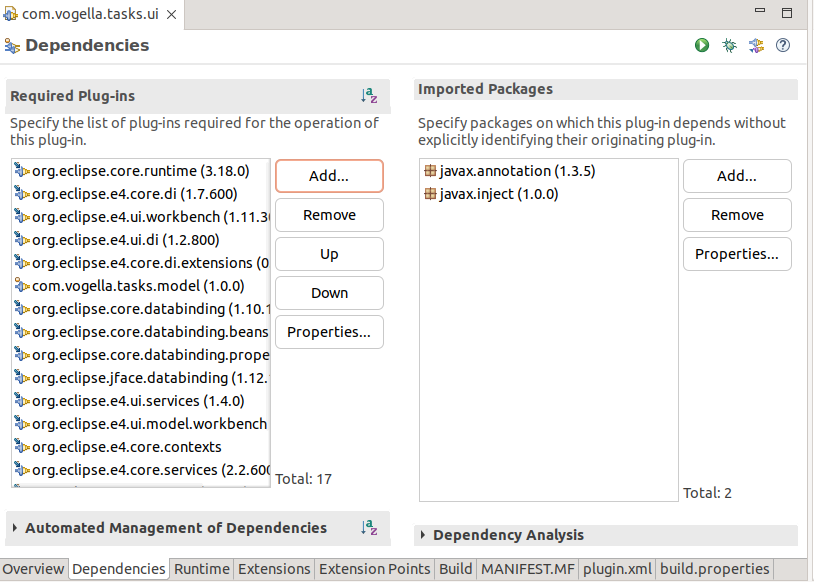
A plug-in dependency allows a plug-in to access all exported packages from this plug-in. A package dependency allows your plug-in to use the classes in this package, independent of which plug-in provides it.
|
Using package dependencies allows you to exchange the plug-in that provides this package. The OSGi specification promotes the usage of package dependencies. If you require this flexibility, prefer the usage of package dependencies. |
|
For legacy reasons, OSGi supports a dynamic import of packages. You should not use this feature, it is a symptom of a non-modular design. |
3.3. Dependencies using versions
A plug-in can define that it depends on a certain version (or a range) of another plug-in. For example, plug-in A can define that it depends on plug-in C in version 2.0. Another plug-in B can define that it depends on version 1.0 of plug-in C.
3.4. Life cycle of plug-ins
During startup, the OSGi runtime reads the plug-in’s manifest file. The runtime validates if all dependencies are present and can be resolved.
If all required dependencies are resolved, the plug-in is in the RESOLVED status; otherwise it stays in the INSTALLED status.
In case several plug-ins exist that can satisfy the dependency, the plug-in with the highest valid version is used.
If the versions are the same, the plug-in with the lowest unique identifier (ID) is used. Every plug-in gets this ID assigned by the framework during the installation.
When the plug-in starts, its status is STARTING. If a plug-in sets the lazy flag to true in its manifest, the Equinox runtime moves that plug-in to the ACTIVE state, if one of its classes or interfaces is used. In this state the plug-in can provide OSGi services in Equinox.
|
Other OSGi runtimes behave differently, for example Felix always activates all plug-ins. |
This lifecycle is depicted in the following graphic.

3.5. Defining a Provisional API using x-internal and x-friends
OSGi allows you to define provisional APIs, i.e., packages that can be accessed by other plug-ins, but are not yet considered stable APIs.
This can be done via the x-internal or the x-friends flag.
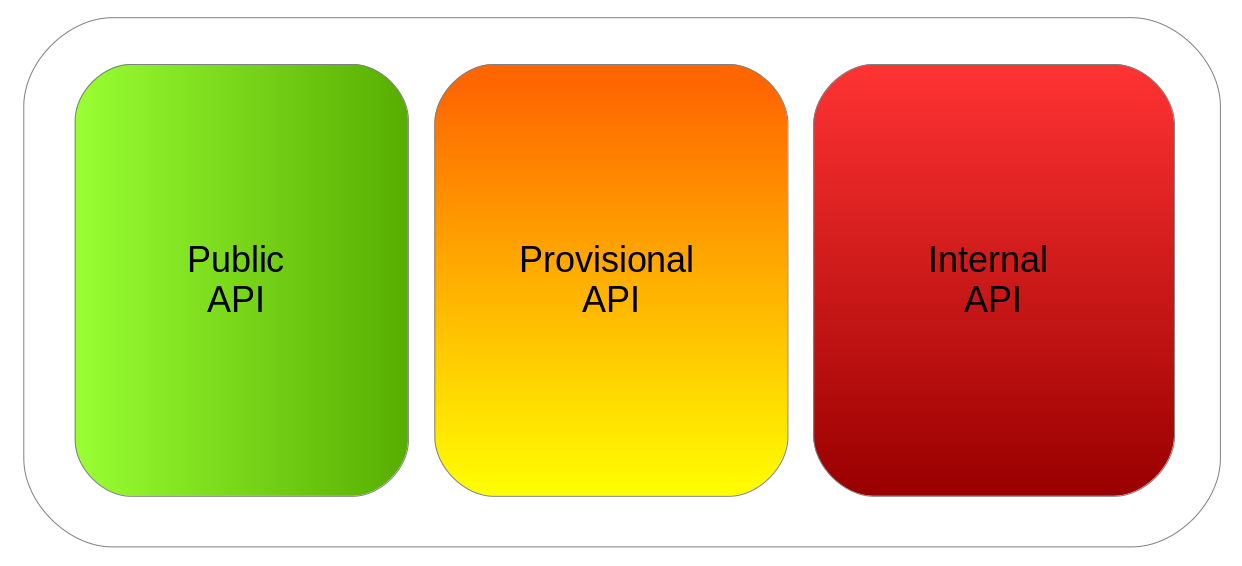
The following screenshot shows how to define a package as provisional API.
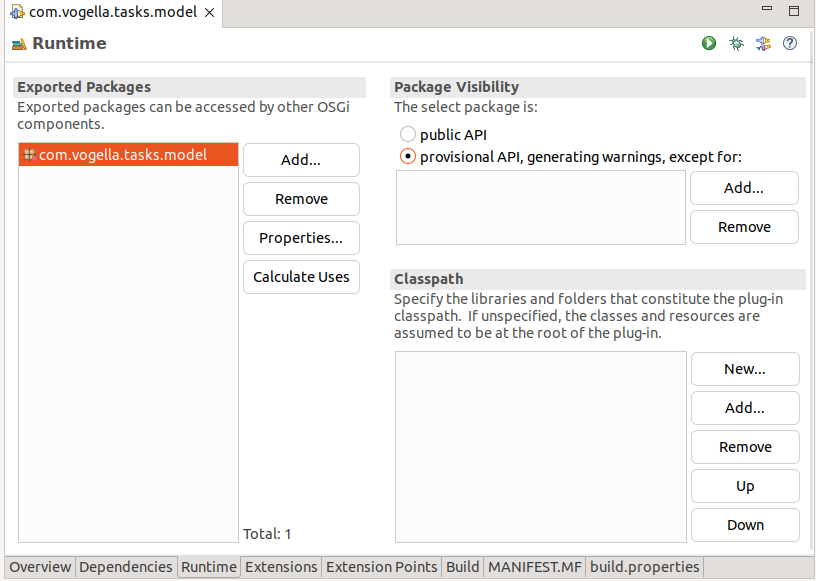
Such a setting would result in the package flagged as x-internal.
Manifest-Version: 1.0
Bundle-ManifestVersion: 2
Bundle-Name: Model
Bundle-SymbolicName: com.vogella.tasks.model
Bundle-Version: 1.0.0.qualifier
Bundle-Vendor: VOGELLA
Automatic-Module-Name: com.vogella.tasks.model
Bundle-RequiredExecutionEnvironment: JavaSE-21
Export-Package: com.vogella.tasks.model;x-internal:=true
x-friends also defines provisional API and allows you to define a set of plug-ins that can access the provisional API without a warning or error message.
x-friends automatically replaces x-internal if you use the Eclipse manifest editor and add a plug-in to the Package Visibility section on the Runtime tab.
Manifest-Version: 1.0
Bundle-ManifestVersion: 2
Bundle-Name: Model
Bundle-SymbolicName: com.vogella.tasks.model
Bundle-Version: 1.0.0.qualifier
Bundle-Vendor: VOGELLA
Automatic-Module-Name: com.vogella.tasks.model
Bundle-RequiredExecutionEnvironment: JavaSE-21
Export-Package: com.vogella.tasks.model;x-friends:="another.bundle"|
You can configure the Java editor to show an error, warning or to ignore usage of provisional API. The default is to display a warning message. You can adjust this in the Eclipse preferences via the preference setting. 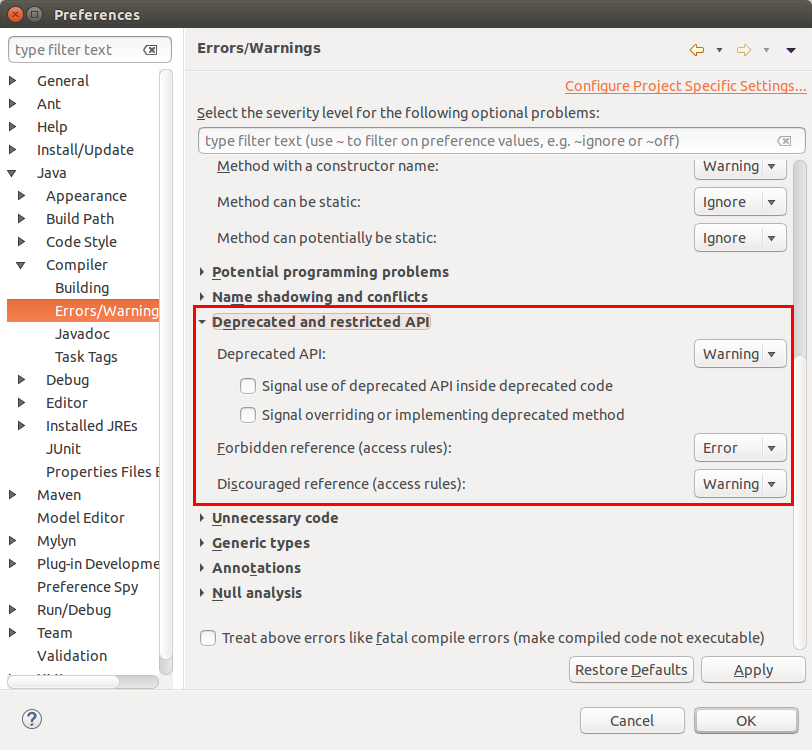 |
3.6. Eclipse platform API
The Eclipse platform project marks almost all packages either as public API or as provisional API. If the Eclipse platform project releases an API, the platform project plans to keep this API stable for as long as possible.
If an API is marked as provisional, the platform team may change it in future releases. If you use such an API, be prepared to make adjustments to your application when you move to a newer Eclipse release.
If you use an unreleased API, you see a Discouraged access: The … is not API (restriction on required project …) warning in the Java editor.
|
You can turn off these warnings for your workspace via and by setting the Discouraged reference (access rules) flag to Ignore. Alternatively, you can turn off these warnings on a per-project basis. To do so, right-click on the project, select , and then use the same path as for accessing the global settings. You might have to activate the Enable project specific settings checkbox at the top of the Error/Warnings preference page. |
3.7. Understanding Eclipse-BuddyPolicy: Registered
In OSGi and Eclipse plug-in development, the Eclipse-BuddyPolicy header is used to specify how a bundle (plug-in) can request or provide class-loading assistance to other bundles.
The Registered policy requires explicit registration of "buddies" (other bundles) using the Eclipse-RegisterBuddy header.
A bundle that declares Eclipse-BuddyPolicy: Registered in its MANIFEST.MF allows other bundles (buddies) to assist with its class loading, but only if those buddies explicitly register themselves.
Other bundles can register themselves as buddies using the Eclipse-RegisterBuddy header in their MANIFEST.MF. Example:
When the bundle with the Registered policy tries to load a class that is not available in its own classpath, it consults its registered buddies.
The buddies are then allowed to attempt to load the class.
The process of class loading is the following:
-
Bundle B registers itself as a buddy for Bundle A.
-
When Bundle A encounters a class that it cannot resolve, it consults its registered buddies.
-
If Bundle B can resolve the class, it loads it on behalf of Bundle A.
3.7.1. Example Scenario
The MANIFEST.MF of bundle A allows buddy registration via the Eclipse-BuddyPolicy: entry.
Bundle-SymbolicName: com.example.bundleA
Eclipse-BuddyPolicy: Registered
The MANIFEST.MF of bundle B registers a buddy via the following Eclipse-RegisterBuddy: entry.
Bundle-SymbolicName: com.example.bundleB
Eclipse-RegisterBuddy: com.example.bundleA
3.7.2. Key Notes
Unlike other policies (e.g., Global or Dependent), the Registered policy requires a more controlled and explicit setup for buddy relationships. This makes it more predictable and avoids the risks of overly permissive class loading.
The buddy relationship is resolved at runtime, not at compile time.
The Registered policy is often used in scenarios where specific bundles must assist with loading classes (e.g., extension points or modular frameworks with shared responsibilities).
3.7.3. Best Practices
Buddy policies, including Registered, should be used sparingly.
Relying on OSGi’s modular class loading and proper exports/imports is generally preferable.
4. OSGi Services
Services enable functionality for other software components. A service interface in OSGi is defined in a plug-in by a standard Java class or an interface. Service implementations for a service interface are published to the OSGi service registry so that other plug-ins can access them.
Multiple plug-ins can provide a service implementation for the service interface. Plug-ins can access the service implementation via the service interface.
During the declaration of a service it is possible to specify key-values pairs that can be used to configure the service.
A service can be dynamically started and stopped, and plug-ins that use services must be able to handle this dynamic behavior. The plug-ins can register listeners to be informed if a service is started or stopped.
To provide a service a plug-in needs to be in the ACTIVE lifecycle status.
OSGi provides several ways of defining, providing and consuming services. The following description focuses on the usage of declarative services.
4.1. OSGi declarative services (OSGi ds)
The OSGi declarative services (DS) allows you to define and consume services via metadata. Tooling allows you to generate service metadata based on annotations in your source code. This topic is covered in the exercises for the Eclipse IDE.
The following is an example of using an annotation to define an OSGi service.
It provides a service implementation for the TaskService interface.
import org.osgi.service.component.annotations.Component;
// more stuff

@Component
public class TransientTaskServiceImpl implements TaskService {
    // as before ...
}|
The preferred way of defining OSGi services is to use the annotations, because this is the simplest way possible. Alternatively, you can also define and register the service component definition manually via an XML file or use the OSGi API for starting, stopping and tracking services. This is covered later. |
The annotation is used to generate an XML file, which is read once the plug-in gets activated.
OSGi service definitions can be:
-
delayed component - a service that is not activated until requested. This means class and implementation loading is delayed until that time. This type must define an OSGi service.
-
immediate component - service is activated as soon as its dependencies are satisfied, does not need to specify a service
-
factory component - creates and activates a new service on request, service is not reused if it becomes unsatisfied or unregistered
The following table gives a brief overview of the OSGi ds terminology, you can skip this table and return to it, in case you want to look up a definition.
| Term | Definition |
|---|---|
Service component |
A Java class inside a bundle that is declared via Component Description and managed by a service component runtime. |
Component Description |
The declaration of a Service Component, contained in an XML document or defined via annotations that are used to generate the XML document. |
Component Configuration |
A Component Description that is parameterized with component properties. It is used to track the component dependencies and manages the Component Instance. |
Component Instance |
The instance of the component implementation class. It is created when a Component Configuration is activated and discarded if the Component Configuration is deactivated. |
4.2. Accessing the BundleContext
Sometimes you need to access information about the bundle, e.g., the bundle version or the bundle name.
Access to the bundle and its bundleContext is performed via the Bundle and BundleContext classes.
You can use the FrameworkUtil class from the OSGi framework to access the BundleContext for a class.
Bundle bundle = FrameworkUtil.getBundle(this.getClass());
BundleContext bundleContext = FrameworkUtil.getBundle(this.getClass()).getBundleContext();
4.3. Immediately activate service
If you want to activate a service immediately after its dependencies are satisfied, the immediate parameter to the @Component annotation can be used.
4.4. Setting the start level for declarative services
You need to ensure that the org.apache.felix.scr plug-in is started before any application plug-in that wants to consume a service.
You can ensure this in your run configuration by setting the auto-start field to true and the start level to a value lower than 4 (4 is the default) for the org.apache.felix.scr plug-in.
The Eclipse RCP framework automatically starts the required plug-ins for using declarative OSGi services. It is not required to manually set a start level in your product configuration file.
4.5. Good practice for defining services
It is a good practice to define a service via a plug-in which only contains the interface definition. Another plug-in would provide the implementation for this service. This allows you to change the implementation of the service via a different plug-in.
4.6. Life cycle
A plug-in that provides a service must be in its ACTIVE lifecycle status.
Therefore, ensure that the Activate this plug-in when one of its classes is loaded flag is set in the MANIFEST.MF file.
The DS annotation support in Eclipse sets this flag automatically, if you use the default settings
|
The above will set the Lazy Activation Policy setting via the Bundle-ActivationPolicy key in the manifest. This is necessary for the Eclipse runtime (Equinox), other OSGi runtimes will always activate bundles if their dependencies are fulfilled. This flag ensures that the bundle is activated (auto-started) as soon as one of its classes is accessed. |
OSGi Services have their own lifecycle, the following states are possible:
| State | Definition |
|---|---|
Enabled/Disabled |
The initial enabled state of a component is specified via a component description. All components are disabled when the bundle is stopped. It is possible to change the enabled state programmatically at runtime via ComponentContext. |
UNSATISFIED |
The component is not ready to be started. See satisfied for the necessary criteria. This status can also be reached again if a component becomes unsatisfied. |
SATISFIED |
A component is in this state when it is enabled and the required referenced services are available.
If the |
REGISTERED |
A component is in REGISTERED state if it is SATISFIED and not yet requested. Only applies for delayed components. |
ACTIVE |
The component was activated due to immediate activation or, in case of a Delayed Component, it was requested. |
If the bundle is started, an OSGi component called SCR checks if the bundle contains component descriptions. It accomplishes this by reading the MANIFEST.MF and searching for Service-Components. If it finds one, it will start to process the component description and create a component configuration. If the configuration is enabled, it checks for required references and configurations if necessary. If all of these conditions are met, the component can be activated.
An Immediate Component will activate as soon as its requirements are fulfilled.
In contrast, a Delayed Component moves to the REGISTERED state and waits for the first request to its provided service. If a Component Configuration contains dynamic references, the references can rebind in ACTIVE state, otherwise it will be re-activated. If a Component Configuration becomes unsatisfied (e.g., a bound service becomes unavailable), the Component Configuration will be deactivated. A Delayed Component will also be deactivated and return to the REGISTERED state if no other bundle references it anymore.
5. More information on OSGi ds services
5.1. References to other services
OSGi service can define dependencies to other services.
You can use the @Reference annotation to define (so-called event) methods to bind to these services and to update them.
You can also use it on fields.
| Method | Description |
|---|---|
bind |
Called to bind a new service to the component. For static references this method is called before the activate method. For dynamic references this method can also be called while the component is active. |
updated |
Called when the configuration properties of a bound service are modified. |
unbind |
Called when the SCR needs to unbind the service. For static references this method is called after the deactivate method. For dynamic references this method can also be called while the component is active. |
The bind event methods are typically prefixed with either bind, set or add. The unbind method should have the corresponding prefixes unbind, unset or remove, so they are automatically picked up by @Reference. T
5.2. Defining the service priority
OSGi allows defining multiple service implementations. To define the importance of them, it is possible to define a ranking for a service.
This is done via a service property, called service.ranking.
By default, the service ranking is zero, the higher the ranking the more important is the service.
The ranking order is defined as follows:
Sorted on descending ranking order (highest first) If the ranking numbers are equal, sorted on ascending service.id property (oldest first)
You can specify these properties via the @ServiceRanking annotation or the property value.
import org.osgi.service.component.annotations.Component;
import org.osgi.service.component.propertytypes.ServiceRanking;

@Component()
@ServiceRanking(5)
public class TestServiceB implements TestService, TestOtherService {

}@Component(
property = {
"service.ranking:Integer=7",
"another.customproperty=online"
}
)
public class OnlineDataService implements DataService {Frameworks like the Eclipse dependency injection framework automatically inject the service with the highest service ranking.
5.3. Configuration
As OSGi service component can be configured via key-value pairs (properties).
These are accessed via a Map<String, Object>.
These properties can be defined via the following ways:
-
inline
-
Java properties file
-
OSGi Configuration Admin
-
via argument of the ComponentFactory.newInstance method if a factory is used
These configurations options are processed in the above order, so a Java properties file can override inline configuration. The first three options are demonstrated in a later exercise.
5.3.1. Inline
You can add properties to a declarative service component via the @Component annotation property type element. The value of that annotation type element is an array of Strings, which need to be given as key-value pairs in the format <name>(:<type>)?=<value> where the type information is optional and defaults to String.
5.3.2. Java properties file
Another way to configure you OSGi services is to use a Java Properties File that is located inside the bundle.
It can be specified via the @Component annotation properties type element, where the value needs to be an entry path relative to the root of the bundle.
5.3.3. Using the OSGi configuration admin
The configuration admin service allows you to configure properties of services. It uses the PID (Persistent IDentity) of the service, which default to the fully qualified class name. You can also configure it via the configurationPid type element of the @Component annotation.
The configurationPolicy property of the @Component annotation allows you to configure whether a configuration is optional, required, or ignored.
-
ConfigurationPolicy.OPTIONAL - Use the corresponding configuration object if present. This is the default value.
-
ConfigurationPolicy.REQUIRE - Configuration object must be present for the service to satisfy its requirements
-
ConfigurationPolicy.IGNORE - Ignore any corresponding configuration object even if it is present. This means that the component properties cannot be changed dynamically using the configuration admin.
To be able to handle changes in the configuration, you can use a method annotated with @Modified.
If you do not do this, the service is stopped and restarted with the new configuration.
6. OSGi Http whiteboard pattern
The OSGi specification allows you to register servlets (web components) via the whiteboard pattern. Deployment descriptors or deployment annotations are not supported.
Via Http Whiteboard it is possible to register:
-
Servlets
-
Servlet Filters
-
Resources
-
Servlet Listeners
The following is an example for a servlet registration via the whiteboard pattern.
@Component(service = Servlet.class ,
           property= "osgi.http.whiteboard.servlet.pattern=/hello",
           scope=ServiceScope.PROTOTYPE)
public class HelloWorldServlet extends javax.servlet.http.HttpServlet {

    protected void doGet(HttpServletRequest req, HttpServletResponse resp)
            throws ServletException, IOException {
            resp.getWriter().println("Hello World");
        }
    }
With the above coding a servlet is registered for the /hello path via the predefined osgi.http.whiteboard.servlet.pattern property.
The first call will call init(), following calls with call only the servlet via the request and the once the servlet is not used anymore, destroy is called.
Webcomponents should always be registered with the scope Prototype, this ensures that init() and destroy() is never call twice on the same instance.
If more than one Http Whiteboard implementation is available in a runtime, the init() and destroy() calls would be executed multiple times, which violates the Servlet specification. It is therefore recommended to use the PROTOTYPE scope for servlets to ensure that every Http Whiteboard implementation gets its own service instance.
7. Using the OSGi console
7.1. Access to the OSGi console for the Eclipse application
If you specify the -console parameter in your run configuration, you can use a console or terminal to interact with the OSGi console.
The OSGi console is like a command-line shell. In this console you can type a command to perform an OSGi action. This can be useful to analyze problems on the OSGi layer of your application.
Use, for example, the command ss to get an overview of all bundles, their status and bundle-id.
The following table is a reference of the most important OSGi commands.
| Command | Description |
|---|---|
help |
Lists the available commands. |
ss |
Lists the installed bundles and their status. |
ss vogella |
Lists bundles and their status that have vogella within their name. |
start <bundle-id> |
Starts the bundle with the <bundle-id> ID. |
stop <bundle-id> |
Stops the bundle with the <bundle-id> ID. |
diag <bundle-id> |
Diagnoses a particular bundle. It lists all missing dependencies. |
install URL |
Installs a bundle from a URL. |
uninstall <bundle-id> |
Uninstalls the bundle with the <bundle-id> ID. |
bundle <bundle-id> |
Shows information about the bundle with the <bundle-id> ID, including the registered and used services. |
headers <bundle-id> |
Shows the MANIFEST.MF information for a bundle. |
services filter |
Shows all available services and their consumers. Filter is an optional LDAP filter, e.g., to see all services that provide a ManagedService implementation use the "services (objectclass=*ManagedService)" command. |
scr:list |
lists all DS components |
scr:info <id> |
dump detailed information for a selected DS component |
|
Add the |
7.2. Required bundles
The following plug-ins are necessary to use the OSGi console. The easiest way to add them to your Eclipse application is to add them directly via the runtime configuration.
-
org.eclipse.equinox.console -
org.apache.felix.gogo.command -
org.apache.felix.gogo.runtime -
org.apache.felix.gogo.shell
7.3. Accessing the OSGi console via a telnet client
If you want to access your application using a Telnet client, you can add another parameter to the -console parameter.
This specifies the port to which you can connect via the telnet protocol.
-console 5555
To access such an application, use a Telnet client.
For instance, on Linux, use the command: telnet localhost 5555.
In an OSGi console accessed via telnet, you can use tab completion and a command history similar to the Bash shell on Linux.
|
The port must be specified if you want to access the OSGi console via the Console view of the Eclipse IDE.
Use only |
7.4. Access to the Eclipse OSGi console
You can also access the OSGi console of your running Eclipse IDE. In the Console view, you find a menu entry with the tooltip Open Console. If you select Host OSGi Console, you will have access to your running OSGi instance.
Please note that interfering with your running Eclipse IDE via the OSGi console, may put the Eclipse IDE into a bad state.
|
The plug-in development tooling (PDE) must be installed in Eclipse. If you can create plug-ins using the wizard, PDE is installed. |
8. Exercise overview
OSGi bundles / plug-ins can be used in standalone OSGi runtime or in an Eclipse RCP application. This text focuses on the usage of OSGi in a standalone environment. If you want to learn about OSGi in RCP, please see our commercial training at Eclipse RCP training.
8.1. Download the Eclipse IDE
To develop Eclipse plug-ins and applications, you need to download an Eclipse IDE suitable for this task. The Eclipse project offers multiple downloads specifically for this purpose. The most commonly used options are:
-
The Eclipse SDK - minimal functionality needed for Eclipse-based development, SDK stands for Software Development Kit
-
The Eclipse IDE for Eclipse Committers package provides additional functionality such as Git support
Download one of these. The Eclipse IDE for Eclipse Committers package includes a Java runtime; no additional download is needed.
We describe two alternatives:
-
the SDK download (recommended)
-
Eclipse IDE for Eclipse Committers
| The appearance of the download page may change over time. |
8.1.1. Alternative 1: Download the Eclipse SDK
Download the latest version from https://download.eclipse.org/eclipse/downloads/ by clicking the link for the most recent release (the version with the highest number) on the SDK download page. The download section will look similar to the screenshot below.

The download is a compressed archive containing multiple files. The format depends on your platform:
-
Windows uses the zip format
-
Linux uses the tar.gz format
-
macOS uses the DMG (Disk Image) format.
The Eclipse SDK does not include a Java runtime; you need to provide this separately.
8.1.2. Alternative 2: Download the Eclipse IDE for Eclipse Committers package
Eclipse provides pre-built packages that can be used.
Download the installer for the Eclipse IDE for Eclipse Committers package from the Eclipse packages website.

This download includes a Java runtime; you do not need to install one separately.
You can use the Eclipse installer to install this package. The installer is useful if you want to download several versions of Eclipse. It uses a shared installation pool for common plug-ins, which reduces the required space.
include::../10_Include/Eclipse/simple-plugin.adoc[]/ == Exercise: Create a plug-in for the task data model
In this exercise, you create a plug-in that contains the definition of a data model. You also make this data model available to other plug-ins to provide certain packages as API.
8.2. Create the plug-in for the data model
Create a simple plug-in project via the menu entry.
Name the plug-in com.vogella.tasks.model.
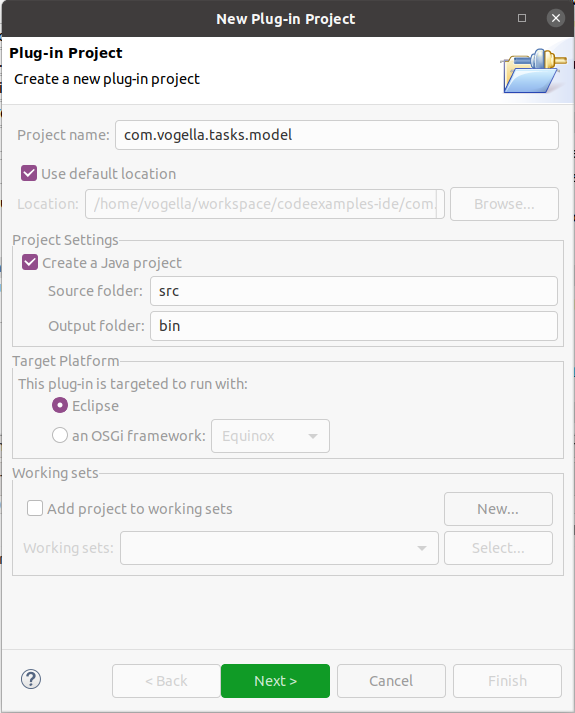
The following screenshot depicts the second page of the plug-in project wizard and its corresponding settings.
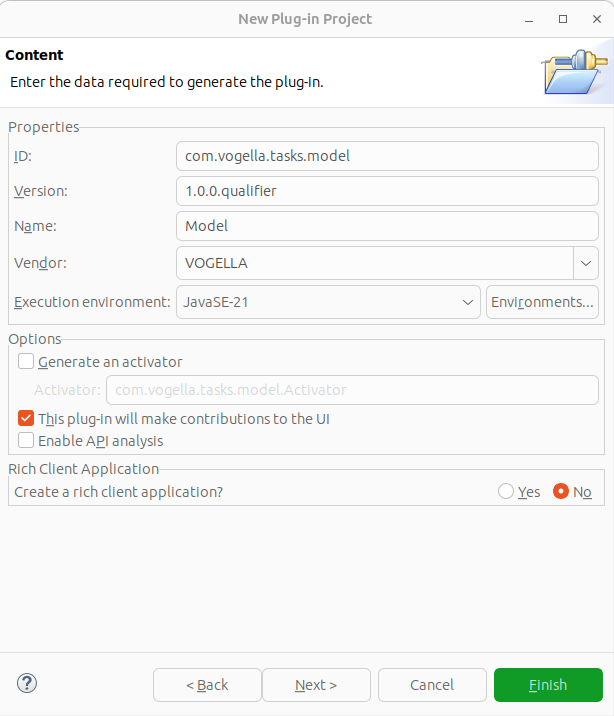
Press the Finish button on this page to avoid the usage of templates.
8.3. Create the base class
Create the com.vogella.tasks.model package and the following model class.
package com.vogella.tasks.model;

import java.time.LocalDate;

public class Task {

    private final long id;
    private String summary = "";
    private String description = "";
    private boolean done = false;
    private LocalDate dueDate = LocalDate.now();

}| You see an error for your final id field. This error is solved in the next section. |
8.4. Generate two constructors
Generate two constructors:
-
a constructor using only the id field
-
a constructor using all fields
You can do this via the Select menu entry.
| Ensure that you have created both constructors, because they are required in the following exercises. |
8.5. Generate getter and setter methods
Use the menu to create getters and setters for your fields.
|
Why is the id field marked as final?
The id field is final; therefore, Eclipse generates only a getter method for it.
This behavior is correct and intentional.
Since this field will be used to generate the |
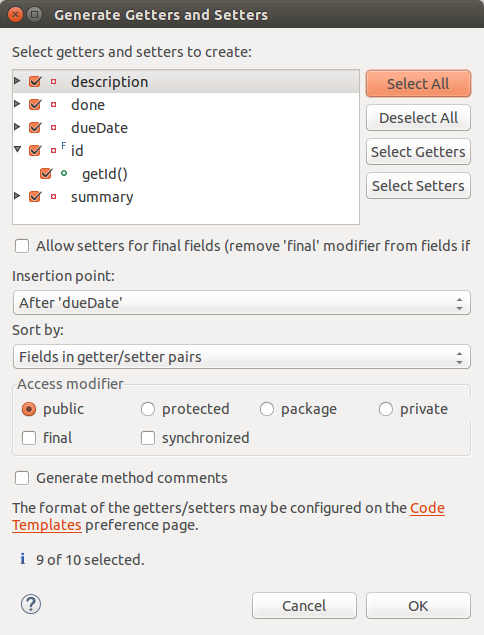
At this point the resulting class should look like the following listing.
package com.vogella.tasks.model;

import java.time.LocalDate;

public class Task {

    private final long id;
    private String summary = "";
    private String description = "";
    private boolean done = false;
    private LocalDate dueDate = LocalDate.now();

    public String getSummary() {
        return summary;
    }
    public void setSummary(String summary) {
        this.summary = summary;
    }
    public String getDescription() {
        return description;
    }
    public void setDescription(String description) {
        this.description = description;
    }
    public boolean isDone() {
        return done;
    }
    public void setDone(boolean done) {
        this.done = done;
    }
    public LocalDate getDueDate() {
        return dueDate;
    }
    public void setDueDate(LocalDate dueDate) {
        this.dueDate = dueDate;
    }
    public long getId() {
        return id;
    }
    public Task(long id, String summary, String description, boolean done, LocalDate dueDate) {
        this.id = id;
        this.summary = summary;
        this.description = description;
        this.done = done;
        this.dueDate = dueDate;
    }
    public Task(long id) {
        this.id = id;
    }
}
8.6. Generate the toString() method
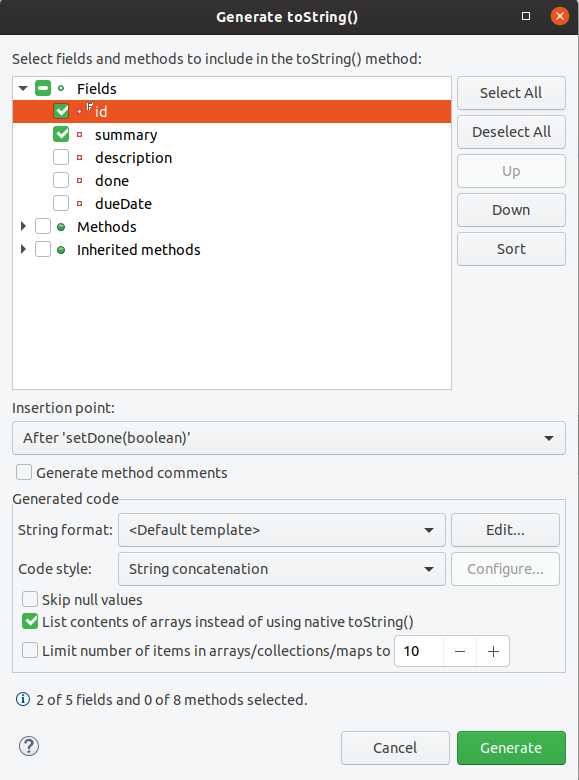
Use the menu entry to generate a toString() method for the Task class based on the id and summary field.
8.7. Generate the hashCode() and equals() methods
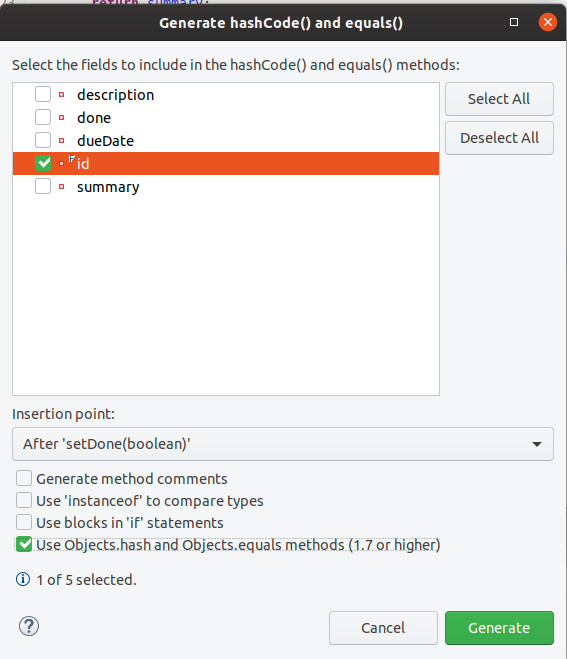
Use the menu entry to generate the hashCode() and equals() methods based on the id field.
Generate the 1.7 or higher version.
8.8. Write a copy() method
Add the following copy() method to the class.
public Task copy() {
    return new Task(
             this.id,
             this.summary,
             this.description,
             this.done,
             this.dueDate);
}
8.9. Add constants for its fields
To access the fields on Task later, create the following constants in the class.
    public static final String FIELD_ID = "id";
    public static final String FIELD_SUMMARY = "summary";
    public static final String FIELD_DESCRIPTION = "description";
    public static final String FIELD_DONE = "done";
    public static final String FIELD_DUEDATE = "dueDate";
8.10. Validate
The resulting Task class should now look similar to the following.
package com.vogella.tasks.model;

import java.time.LocalDate;
import java.util.Objects;

public class Task {

    public static final String FIELD_ID = "id";
    public static final String FIELD_SUMMARY = "summary";
    public static final String FIELD_DESCRIPTION = "description";
    public static final String FIELD_DONE = "done";
    public static final String FIELD_DUEDATE = "dueDate";

    private final long id;
    private String summary = "";
    private String description = "";
    private boolean done = false;
    private LocalDate dueDate = LocalDate.now();

    public Task(long id, String summary, String description, boolean done, LocalDate dueDate) {
        this.id = id;
        this.summary = summary;
        this.description = description;
        this.done = done;
        this.dueDate = dueDate;
    }

    public Task(long id) {
        this.id = id;
    }

    public String getSummary() {
        return summary;
    }

    public void setSummary(String summary) {
        this.summary = summary;
    }

    public String getDescription() {
        return description;
    }

    public void setDescription(String description) {
        this.description = description;
    }

    public boolean isDone() {
        return done;
    }

    public void setDone(boolean done) {
        this.done = done;
    }

    public LocalDate getDueDate() {
        return dueDate;
    }

    public void setDueDate(LocalDate dueDate) {
        this.dueDate = dueDate;
    }

    public long getId() {
        return id;
    }

    @Override
    public String toString() {
        return "Task [id=" + id + ", summary=" + summary + "]";
    }

    public Task copy() {
        return new Task(this.id, this.summary, this.description, this.done, this.dueDate);
    }

    @Override
    public int hashCode() {
        return Objects.hash(id);
    }

    @Override
    public boolean equals(Object obj) {
        if (this == obj)
            return true;
        if (obj == null)
            return false;
        if (getClass() != obj.getClass())
            return false;
        Task other = (Task) obj;
        return id == other.id;
    }
}
8.11. Define a service interface to access tasks
Create the following TaskService interface.
package com.vogella.tasks.model;

import java.util.List;
import java.util.Optional;
import java.util.function.Consumer;

public interface TaskService {

    /**
     * Get all tasks
     */
    List<Task> getAll();

    /**
     * Updates existing task or create new task
     *
     * @param task
     * @return
     */
    boolean update(Task task);

    /**
     * Returns an Optional wrapping a task or an empty Optional if no task exists for the given id
     *
     * @param task
     * @return empty optional if not found, otherwise Optional holding the task
     */

    Optional<Task> get(long id);

    /**
     *  Deletes the task with the id
     * @param id task id to delete
     * @return true if task existed and was deleted, false otherwise
     */
    boolean delete(long id);

    /**
     * Allows specifying a consumer that retrieves all tasks
     *
     * @param tasksConsumer
     */

    void consume(Consumer<List<Task>> tasksConsumer);

}
8.12. Define the API of the model plug-in
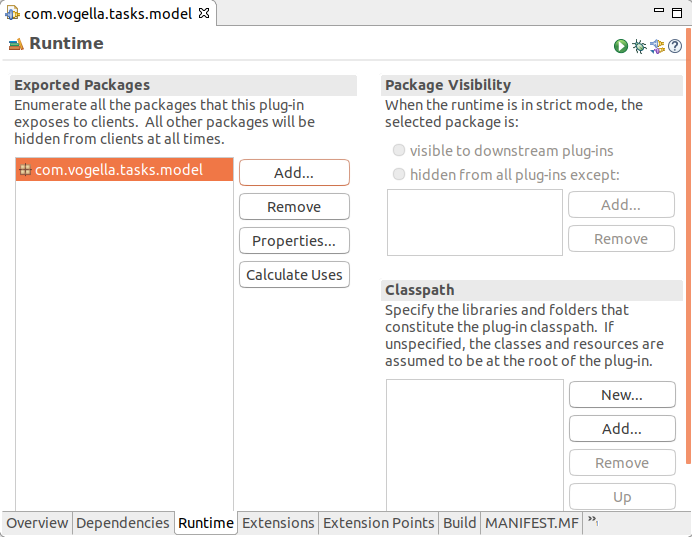
Export the com.vogella.tasks.model package to define it as API.
For this, open the MANIFEST.MF file and select the Runtime tab.
Add com.vogella.tasks.model to the exported packages.
8.13. Next Steps
In the following exercises, you will implement and use an OSGi service that uses this data model.
9. Exercise: Create a run configuration for your OSGi application
In this exercise, you set up a run configuration for your OSGi runtime in the Eclipse IDE.
9.1. Create run configuration
Select from the top-level menu. Select OSGi Framework and press the new button.
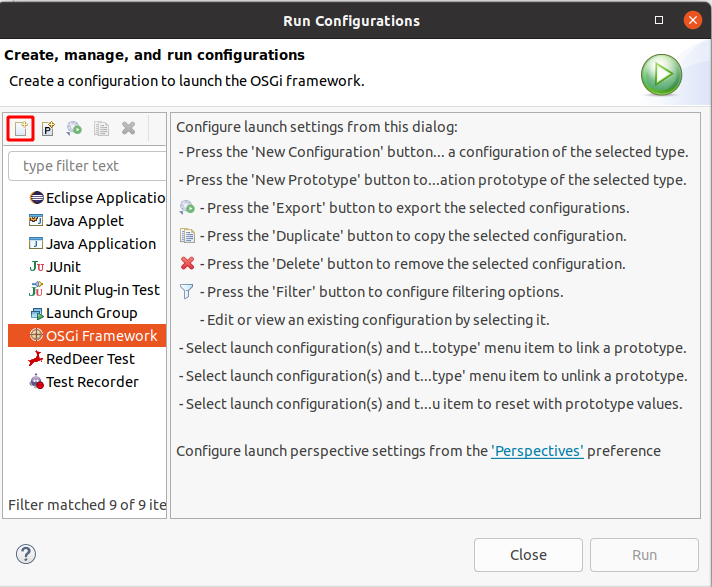
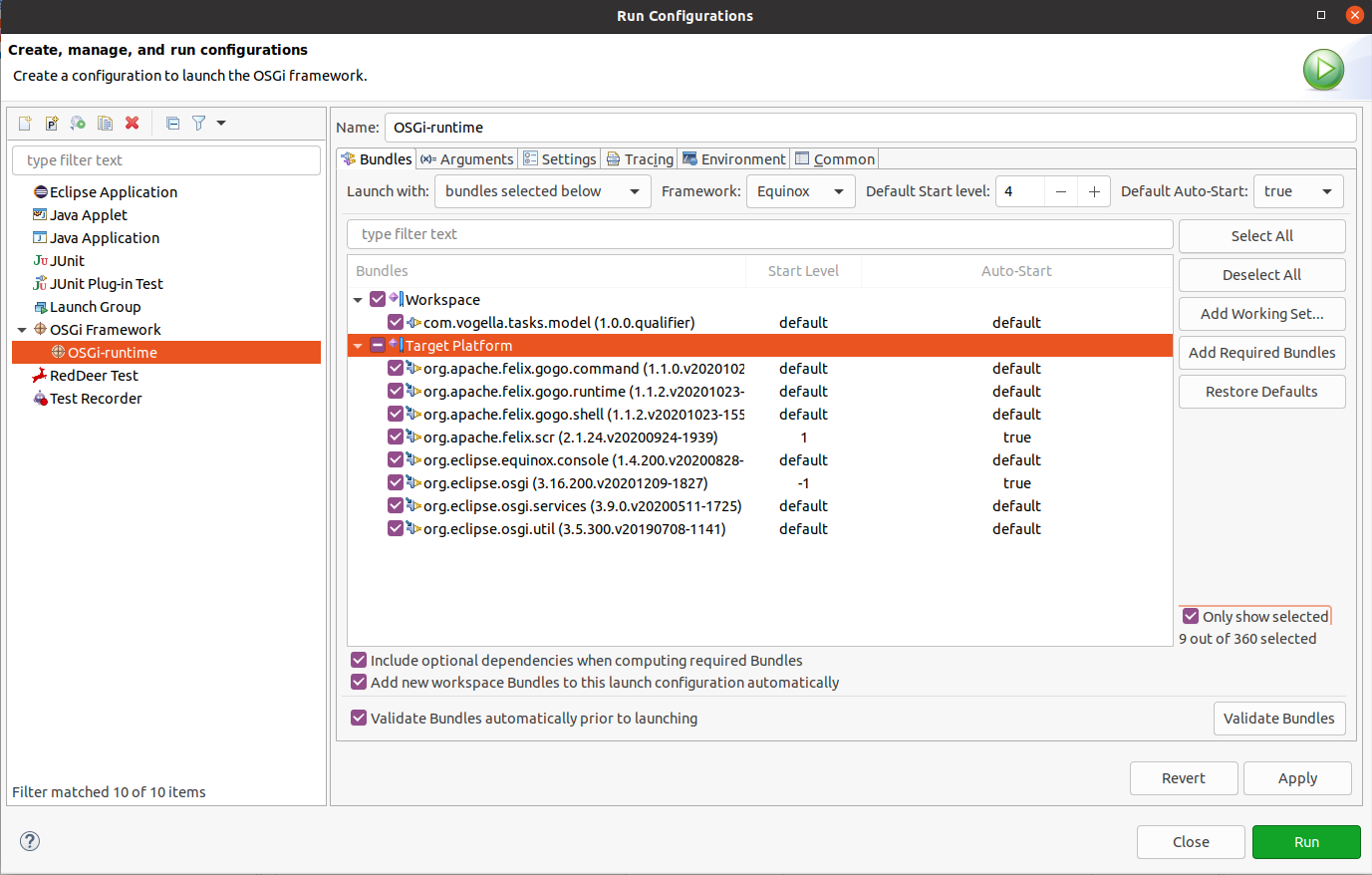
On the Bundles tab, deselect all existing selection and add the following framework plug-ins:
-
org.eclipse.osgi
-
org.eclipse.osgi.util
-
org.eclipse.osgi.services
-
org.eclipse.equinox.console
-
org.apache.felix.gogo.shell
-
org.apache.felix.gogo.runtime
-
org.apache.felix.gogo.command
-
org.apache.felix.scr
Also add your plug-in to the runtime.
-
com.vogella.tasks.model
As a result the following bundles should be selected.
9.2. Check arguments
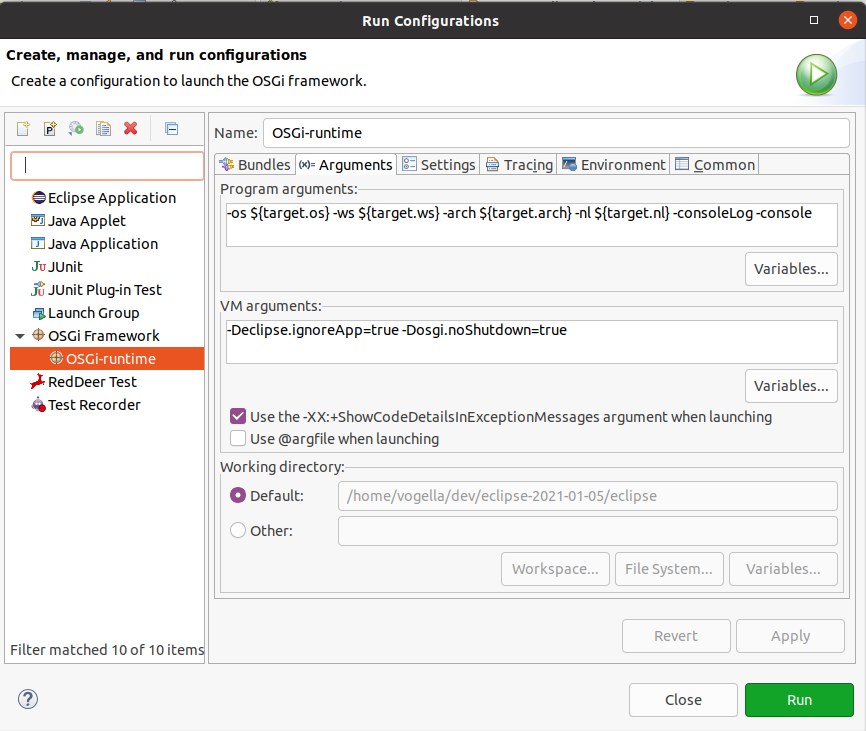
Switch to the Arguments tag.
The generated run configuration uses the -console parameter by default.
Also it specifies the VM argument, eclipse.ignoreApp and osgi.noShutdown.
9.3. Equinox startup parameters
9.3.1. Parallel bundle activation
Equinox supports parallel bundle activation during start-level processing via the equinox.start.level.thread.count system property.
-
By default, this is set to
1, which means bundles are activated sequentially. -
Set it to a higher value (e.g.,
4or8) to activate bundles in parallel using that many threads. -
Set it to
0to use the number of available CPUs as the thread count.
To enable parallel activation with 4 threads, add the following VM argument:
-Dequinox.start.level.thread.count=4To let Equinox choose the thread count based on the available CPUs:
-Dequinox.start.level.thread.count=0|
Parallel bundle activation can improve startup time for applications with many bundles, but may surface concurrency issues in bundles that are not thread-safe during activation. |
9.3.2. Resolver batch size
The equinox.resolver.revision.batch.size system property controls how many bundle revisions are resolved in a single batch during bulk resolution (e.g., at startup when many unresolved bundles need wiring).
-
By default, this is set to
2147483647(unlimited), meaning all revisions are resolved in one batch. -
Setting a smaller value (e.g.,
50or100) breaks the work into smaller chunks. -
This serves as a memory safety mechanism: if a batch causes an
OutOfMemoryErroror times out (controlled byequinox.resolver.batch.timeout, in milliseconds), the resolver falls back to resolving bundles one by one, which is slower but uses less memory.
|
In applications with many bundles that declare a large number of package imports, bulk resolution can consume significant memory.
In such cases, setting a smaller batch size may be required to avoid |
To limit batch resolution to 100 revisions at a time:
-Dequinox.resolver.revision.batch.size=1009.4. Run your OSGi application
Press the Run button to start your OSGi runtime.
By default, this starts an OSGi runtime with your modules.
As you specified the `-console ` parameter, you can use OSGi console commands.
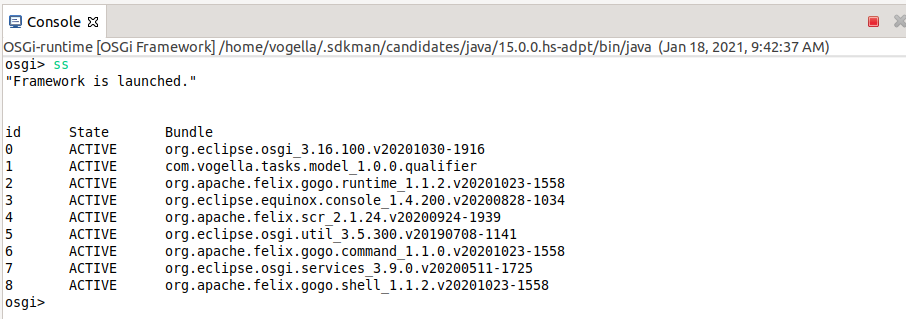
Type ss into the console view to get an overview of the plug-ins and their status.
The model plug-in should be listed and in RESOLVED or in the ACTIVE status, if the Default Auto-Start setting on the Bundles tab is set to true.
In the next exercise you define an OSGi service that uses this plug-in.
9.6. Terminate running OSGi instance
As you specified the osgi.noShutdown=true flag, the OSGi application will not shutdown.
This is useful if the OSGi instance provides services to the outside.
Use the exit command or the terminate button to terminate the running instance.

If you have multiple instance running, you can use the drop-down button in Eclipse to switch to them.

10. Exercise: Implementing and providing an OSGi service
In this exercise, you create a plug-in for a service implementation. This implementation provides access to the task data.
|
This service implementation uses transient data storage, i.e., the data is not persisted between application restarts. A later exercise will persist the data as JSON on the file system. |
10.1. Create a new plug-in for the OSGi service
Create a new simple plug-in project called com.vogella.tasks.services.
|
The macOS operating system treats folders ending with .service as special, therefore we use the .services ending. |
10.2. Define the dependencies in the service plug-in
To use classes from other plug-ins in a plug-in, you need to add a dependency to them.
To achieve this, open the MANIFEST.MF file of the com.vogella.tasks.services plug-in.
Select the Dependencies tab and add the following to the Imported Packages selection:
-
com.vogella.tasks.model
The expected output is shown in the screenshot below.
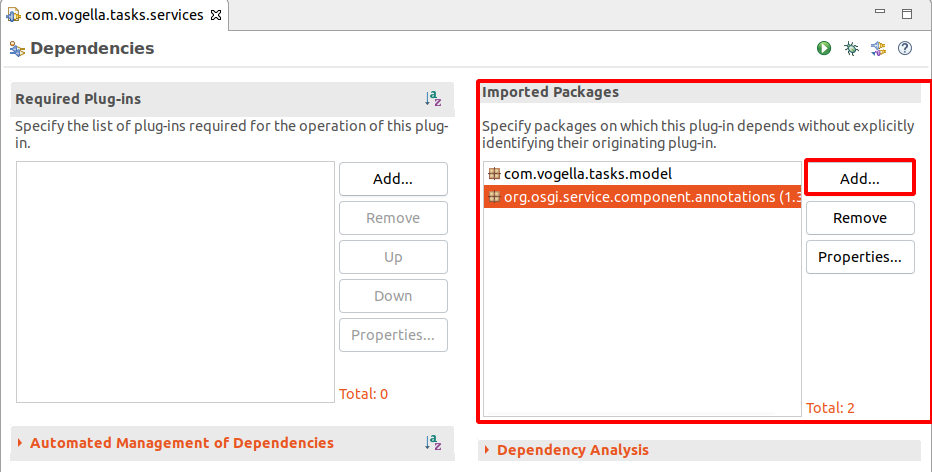
The text file should look similar to the following listing.
Manifest-Version: 1.0
Bundle-ManifestVersion: 2
Bundle-Name: Services
Bundle-SymbolicName: com.vogella.tasks.services
Bundle-Version: 1.0.0.qualifier
Import-Package: com.vogella.tasks.model
Bundle-Vendor: VOGELLA
Automatic-Module-Name: com.vogella.tasks.services
Bundle-RequiredExecutionEnvironment: JavaSE-21
10.3. Enable annotation processing and plug-in activation
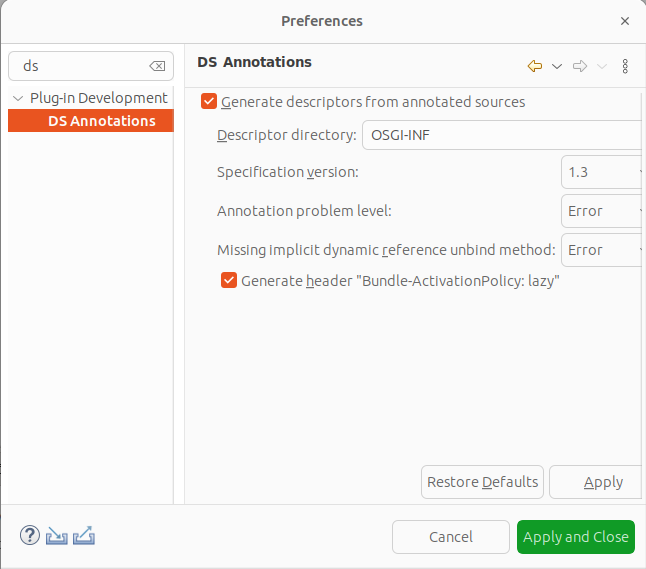
You want to generate OSGi service metadata based on annotations in classes. For this, enable the option under .
10.4. Provide an implementation of the TaskService interface
Create the com.vogella.tasks.services.internal package in your service plug-in and add the following class.
package com.vogella.tasks.services.internal;

import java.time.LocalDate;
import java.util.ArrayList;
import java.util.List;
import java.util.Optional;
import java.util.concurrent.atomic.AtomicInteger;
import java.util.function.Consumer;
import java.util.stream.Collectors;

import org.osgi.service.component.annotations.Component;

import com.vogella.tasks.model.Task;
import com.vogella.tasks.model.TaskService;

@Component (1)
public class TransientTaskServiceImpl implements TaskService {

    private static AtomicInteger current = new AtomicInteger(1);
    private List<Task> tasks;

    public TransientTaskServiceImpl() {
        tasks = createTestData();
    }

    @Override
    public List<Task> getAll() {
        return tasks.stream().map(Task::copy).collect(Collectors.toList());
    }

    @Override
    public void consume(Consumer<List<Task>> taskConsumer) {
        // always pass a new copy of the data
        taskConsumer.accept(tasks.stream().map(Task::copy).collect(Collectors.toList()));
    }

    // create or update an existing instance of a task object
    @Override
    public synchronized boolean update(Task newTask) {
        // hold the Optional object as a reference to determine if the object is
        // newly created or not
        Optional<Task> taskOptional = findById(newTask.getId());

        // get the actual object or create a new one
        Task task = taskOptional.orElse(new Task(current.getAndIncrement()));
        task.setSummary(newTask.getSummary());
        task.setDescription(newTask.getDescription());
        task.setDone(newTask.isDone());
        task.setDueDate(newTask.getDueDate());

        if (!taskOptional.isPresent()) {
            tasks.add(task);
        }
        return true;
    }

    @Override
    public Optional<Task> get(long id) {
        return findById(id).map(Task::copy);
    }

    @Override
    public boolean delete(long id) {
        Optional<Task> deletedTask = findById(id);
        deletedTask.ifPresent(t -> tasks.remove(t));
        return deletedTask.isPresent();
    }

    // Example data, change if you like
    private List<Task> createTestData() {
        List<Task> list = List.of(
                create("Application model", "Dynamics"), create("Application model", "Flexible and extensible"),
                create("DI", "@Inject as programming mode"), create("OSGi", "Services"),
                create("SWT", "Widgets"), create("JFace", "Especially Viewers!"),
                create("CSS Styling", "Style your application"),
                create("Eclipse services", "Selection, model, Part"),
                create("Renderer", "Different UI toolkit"), create("Compatibility Layer", "Run Eclipse 3.x"));
        return new ArrayList<>(list);
    }

    private Task create(String summary, String description) {
        return new Task(current.getAndIncrement(), summary, description, false,
            LocalDate.now().plusDays(current.longValue()));
    }

    private Optional<Task> findById(long id) {
        return tasks.stream().filter(t -> t.getId() == id).findAny();
    }
}| 1 | The @Component annotation triggers the generation of OSGi metadata to the class available as OSGi services for the TaskService interface. |
10.5. Optional: Make due date different
Currently, all tasks have the same due date.
You can change this by modifying the create() method in the `TransientTaskServiceImpl.
    private Task create(String summary, String description) {
        int id = current.getAndIncrement();
        // Use the id to deterministically vary the due date
        LocalDate baseDate = LocalDate.now();
        // Create a consistent offset between -3 and +3 days based on the id
        int offset = (id % 7) - 3;
        LocalDate dueDate = baseDate.plusDays(offset);
        return new Task(id, summary, description, false, dueDate);
    }
10.6. Check manifest
The full manifest looks similar to the following listing:
Manifest-Version: 1.0
Bundle-ManifestVersion: 2
Bundle-Name: Services
Bundle-SymbolicName: com.vogella.tasks.services
Bundle-Version: 1.0.0.qualifier
Import-Package: com.vogella.tasks.model
Service-Component: OSGI-INF/com.vogella.tasks.services.TransientTaskServiceImpl.xml
Bundle-Vendor: VOGELLA
Automatic-Module-Name: com.vogella.tasks.services
Bundle-ActivationPolicy: lazy
Bundle-RequiredExecutionEnvironment: JavaSE-21
10.7. Add the new plug-in to the product
Add your new plug-ins to your feature:
-
com.vogella.tasks.services -
com.vogella.tasks.model
Ensure that you use the Plug-ins tab on the feature.xml file.
Start your application via your product configuration to ensure that the plug-ins added to the feature are correctly included in the runtime.
|
Every time you create a new plug-in and refer to it in your |
10.8. Further steps
By default, the OSGi runtime initializes and provides services on demand. Therefore, you must explicitly consume an OSGi service for it to start. This is done in the next exercises.
11. Exercise: Consume the OSGi service using an immediate OSGi component
In this exercise, you will create another OSGi component that consumes the created service. As this OSGi component is not a service, it is called an immediate component and activated as soon as its dependencies are satisfied.
OSGi does not use JSR 330 (with @Inject) for this purpose but uses its custom (compile-time) annotations for this.
Ensure you enabled the DS Annotations setting in the preferences of Eclipse to ensure that these annotations are used to generate the necessary configuration files.
11.1. Create a new plug-in
Create another simple plug-in named com.vogella.osgi.taskconsumer.
11.2. Add manifest dependencies
Add the required package dependencies in the manifest to use the TaskService interface and the @Component annotation.
See below solution for the correct entry.
-
com.vogella.tasks.model
-
org.osgi.service.component.annotations, ensure to use as minimum version 1.3.0 and make the resolution optional
|
A dependency to com.vogella.task.services is NOT necessary, the implementation is provided by OSGi without direct dependency. |
11.3. Add an immediate OSGi component
Use the @Component annotation to add another OSGi component via a class named TaskConsumer.
Receive the TaskService the @Reference annotation, either on a field or on a method.
Also implement a method annotated with the @Activate annotation to write to the number of tasks to the console.
This tasks can be received from the service.
Solution example
package com.vogella.osgi.taskconsumer;

import org.osgi.service.component.annotations.Activate;
import org.osgi.service.component.annotations.Component;
import org.osgi.service.component.annotations.Reference;

import com.vogella.tasks.model.TaskService;

@Component
public class TaskConsumer {

    @Reference
    TaskService taskService;

// The above shows a field reference, you could also use @Reference on a method
//  private void bindTaskService(TaskService taskService) {
//      this.taskService = taskService;
//      System.out.println("Injected " + taskService);
//  }
//
//  @SuppressWarnings("unused")
//  private void unbindTaskService(TaskService taskService) {
//      System.out.println("Removed " + taskService);
//      taskService = null;
//  }

    @Activate
    public void activate() {
        System.out.println("Activate called");
        System.out.println("Number of tasks: " + taskService.getAll().size());
    }
}
Also add Require-Capability: osgi.service;filter:="(objectClass=com.vogella.tasks.model.TaskService)" to your MANIFEST.MF, indicating that such a service is required for this plug-in to work.
The resulting MANIFEST should look like the following, Service-Component and Bundle-ActivationPolicy are added by the tooling.
Manifest-Version: 1.0
Bundle-ManifestVersion: 2
Bundle-Name: Taskconsumer
Bundle-SymbolicName: com.vogella.osgi.taskconsumer
Bundle-Version: 1.0.0.qualifier
Bundle-Vendor: VOGELLA
Automatic-Module-Name: com.vogella.osgi.taskconsumer
Bundle-RequiredExecutionEnvironment: JavaSE-21
Require-Capability: osgi.service;filter:="(objectClass=com.vogella.tasks.model.TaskService)"
Import-Package: com.vogella.tasks.model,
 org.osgi.service.component.annotations;version="1.3.0";resolution:=optional
Service-Component: OSGI-INF/com.vogella.osgi.taskconsumer.TaskConsumer.xml
Bundle-ActivationPolicy: lazy
11.4. Add to your product
Add the new plug-in to your product via your feature.
11.5. Validate
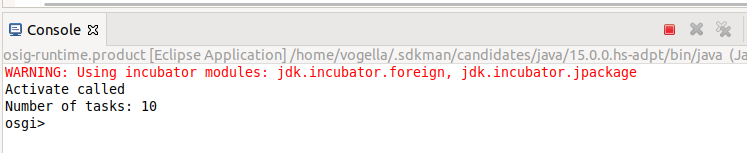
Start again via the product and ensure you see the output of the @Activate on the console.
11.6. Remove the System.out statement
Remove the System.out statements in TaskConsumer, these are only useful to demonstrate the functionality but should be removed to avoid unnecessary output on the console in future exercises.
12. Exercise: Validate
Add your com.vogella.osgi.taskconsumer plug-in to your run configuration.
Start your OSGi runtime and observe the output of the your console.
You should see the output of the OSGi service consumption.
13. Exercise: Create a feature based product for the runtime configuration
To manage the plug-ins included in the OSGi runtime, you can use a product configuration file. While the product originates from the Eclipse IDE and RCP development point of view and is not perfect for OSGi development, it can still be handy to have one place to configure your run configuration.
This product can also be used for a Maven Tycho command line build.
In this exercise, you create one product based on features.
13.1. Create a feature project
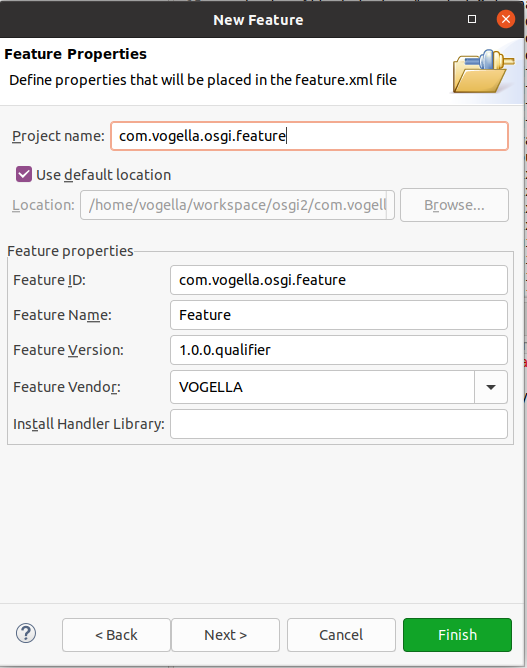
Create a feature project named com.vogella.osgi.feature via .
If you have already an existing launch configuration you can use that to populate the feature.
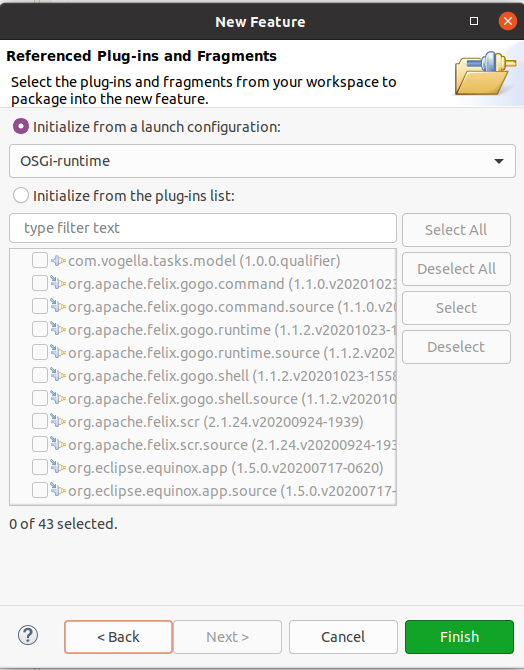
Open the feature.xml file and switch to the _Included Plug-ins` tag.
Ensure the following framework plug-ins are included in your feature.xml file:
-
org.eclipse.osgi
-
org.eclipse.osgi.util
-
org.eclipse.osgi.services
-
org.eclipse.equinox.console
-
org.apache.felix.gogo.shell
-
org.apache.felix.gogo.runtime
-
org.apache.felix.gogo.command
-
org.apache.felix.scr
Also ensure that your plug-in is part of the feature.
-
com.vogella.tasks.model
13.2. Create a project to host the product configuration file
Create a new project named com.vogella.osgi.runtime of type General via the menu entry.
13.3. Create a product configuration file
Right-click on the com.vogella.osgi.runtime project and select .
Create a product configuration file called osgi-runtime.product inside the main folder of the project using basis settings.
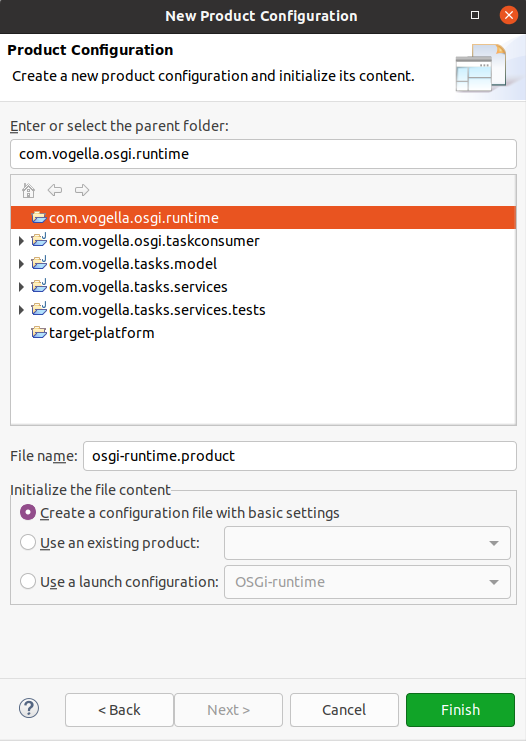
Press the Finish button. The file is created and opened in an editor.
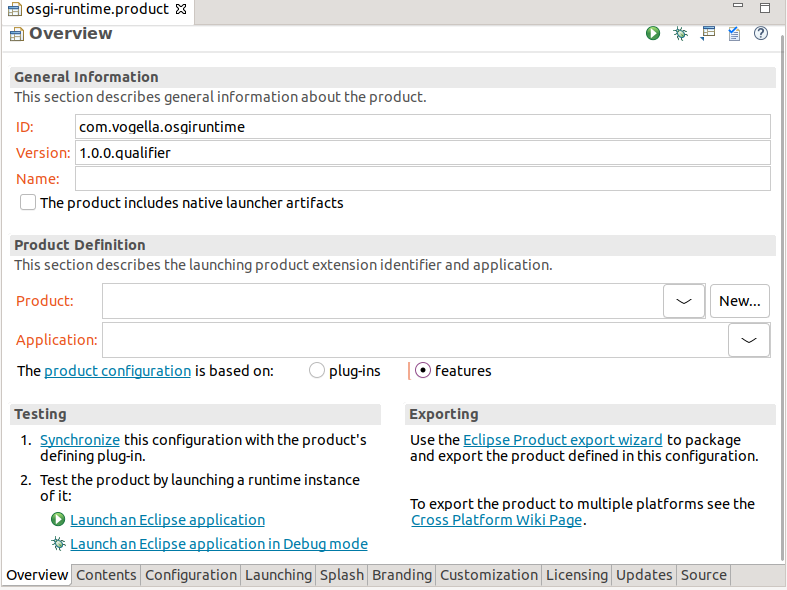
On the Overview tab ensure the following settings:
-
ID = com.vogella.osgiruntime
-
Version = 1.0.0.qualifier
-
Uncheck The product includes native launcher artifacts
Leave the product and application empty. Product and Application are used in RCP products, and therefore not needed for a headless OSGi command line application.
Also set that the product is based on features.
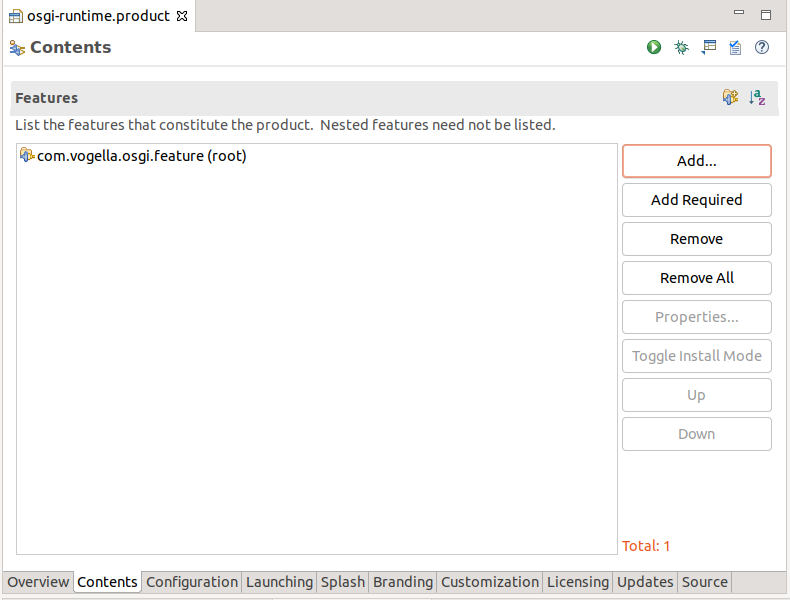
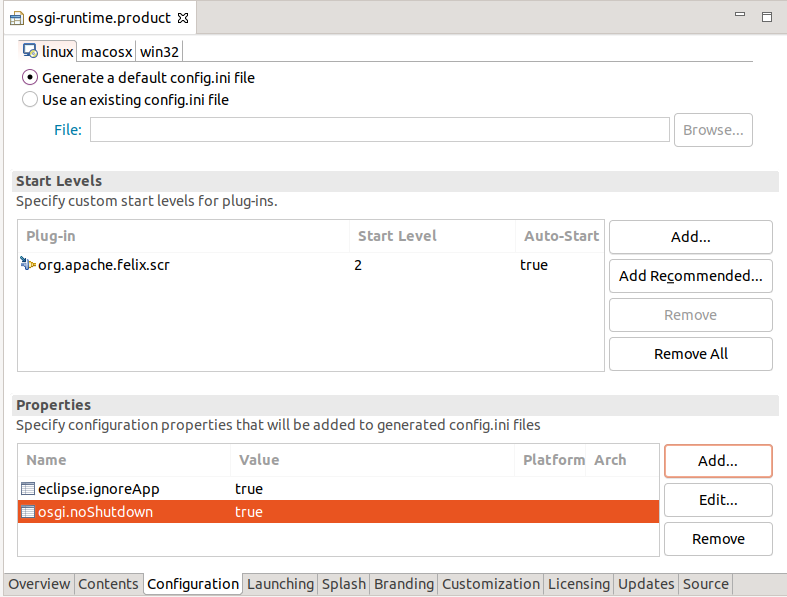
13.5. Configuration
Configure the Start Levels:
-
org.apache.felix.scr, StartLevel = 2, Auto-Start = true
|
Equinox does not automatically activate any bundle. Bundles are only activated if a class is directly requested from it. But the service component runtime is never required directly. So you need to configure that it is activated, otherwise, org.apache.felix.scr will never get activated. |
Configure the following properties:
| Properties | Description |
|---|---|
eclipse.ignoreApp = true |
Tells Equinox to skip trying to start an Eclipse application. |
osgi.noShutdown = true |
The OSGi framework will not be shut down after the Eclipse application has ended. You can find further information about these properties in the Equinox Framework QuickStart Guide and the Eclipse Platform Help. |
13.6. Adjust launch configuration
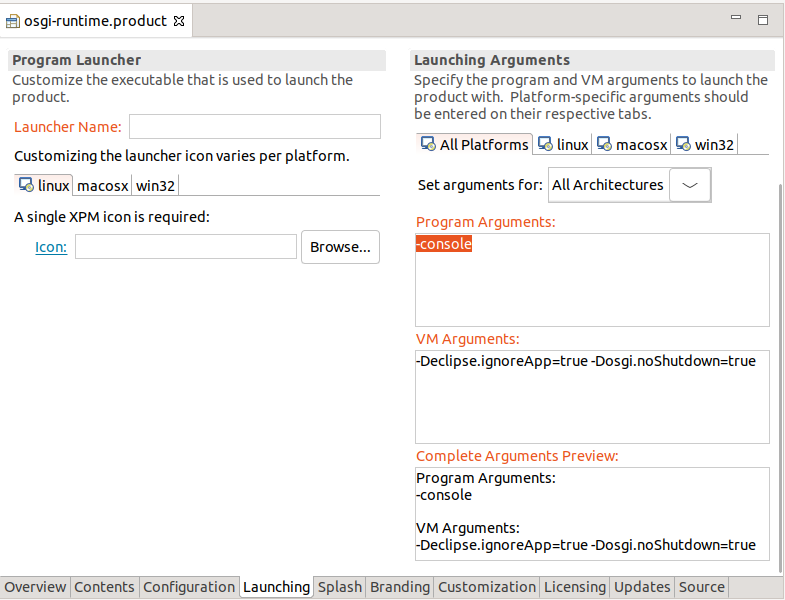
The above configuration is used for the exported application. You also have to configure the parameters for the start from the IDE.
Add on the Launching tab:
-
On the Program Arguments: -console
-
On the VM Arguments: -Declipse.ignoreApp=true -Dosgi.noShutdown=true
|
When adding the parameters in the Launching tab instead of the Configuration tab, the configurations are added to the eclipse.ini in the root folder, not to the config.ini in the configuration folder. When starting the application via the exported jar, the eclipse.ini in the root folder is not inspected. |
13.7. Validate
Click on the Run button to start your OSGi command line application.
|
If the system shows an validation error that the application is not maintained, you can ignore that. |
14. Optional exercise: Use the OSGi console
In this exercise, you learn how to use the OSGi console to analyze the state of your plug-ins at runtime.
Ensure that the -console parameter is set in your run configuration as runtime parameter.
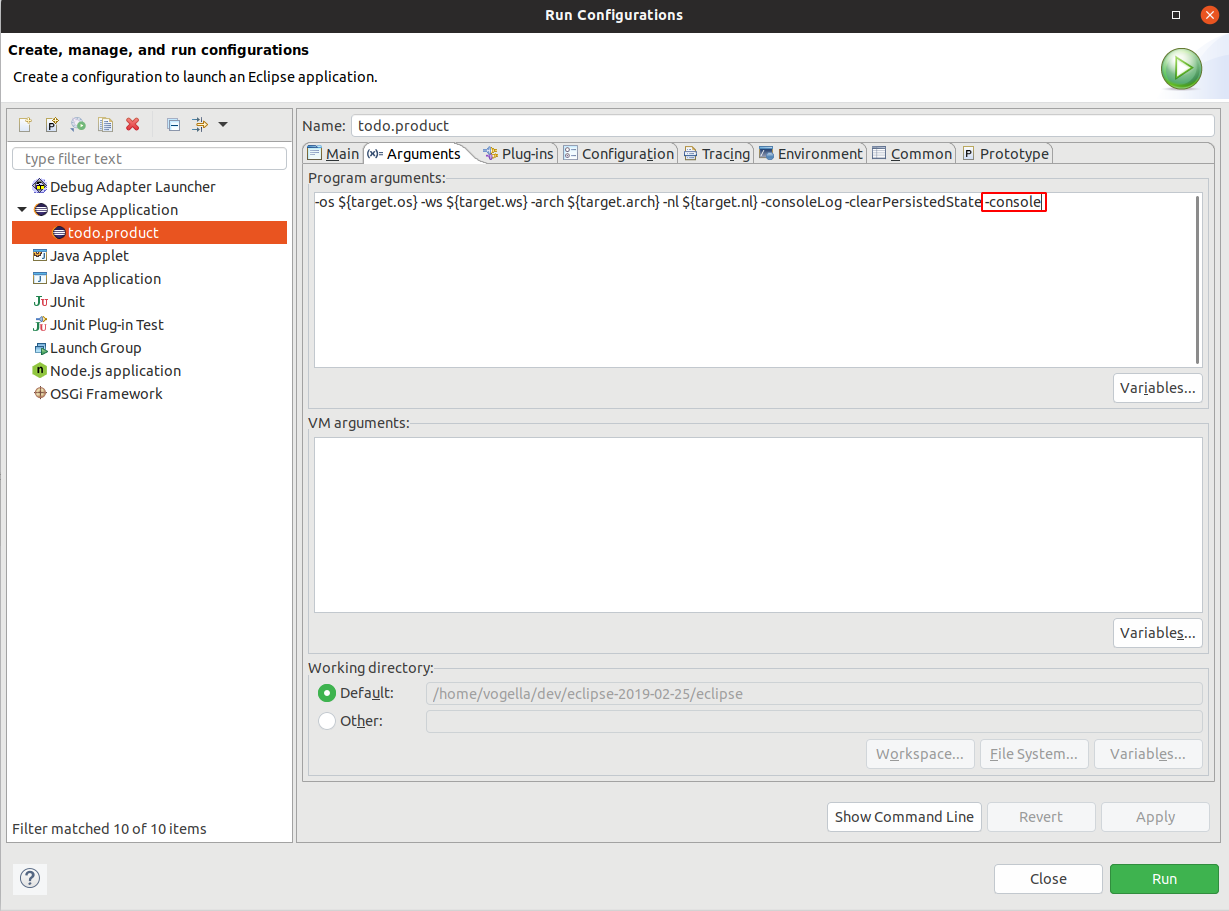
|
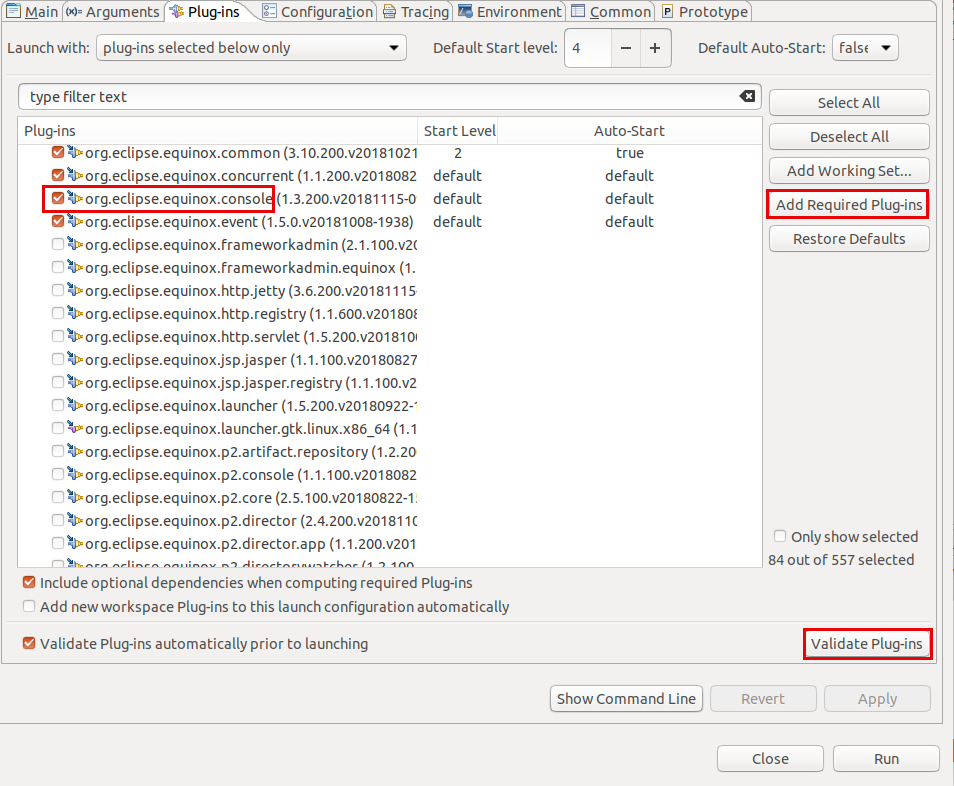
To use the console, you need to have the following components included in your runtime:
If you followed this description, this should already be the case. Click the |
Start your application. In the Console view of Eclipse, use the following commands:
-
ss- see short status of your plug-ins, also shows the IDs of the plug-ins -
bundle <id-of-the-plug-in>- get an overview of the bundle -
diag <id-of-the-plug-in>- get information about the bundle -
scr:list- show all the OSGi components -
scr:list <id-of-the-plug-in>- show the OSGi components of that plug-in
15. Exercise: Extend the OSGi console with additional commands
In this exercise, you learn how to add additional commands to the OSGi console.
15.1. Create a new plug-in and its dependencies
Create a new plug-in named com.vogella.osgi.console.
Add the following imported package dependencies to its manifest:
-
org.osgi.service.component.annotations
-
org.eclipse.osgi.framework.console
As always, mark org.osgi.service.component.annotations as optional.
15.2. Create implementation
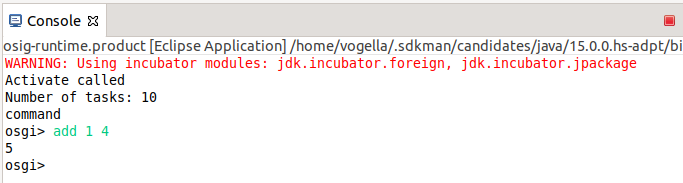
To extend the OSGi console, provide new class AndQuitCommand implements org.eclipse.osgi.framework.console.CommandProvider as OSGi component via the @Component annotation.
Add methods prefixed with _ are available as additional commands.
For example, you can add the following method to provide the add command that takes two parameters.
import org.eclipse.osgi.framework.console.CommandInterpreter;
// more code
public void _add(CommandInterpreter ci) {
        int a = Integer.parseInt(ci.nextArgument());
        int b = Integer.parseInt(ci.nextArgument());
        ci.println(a+b);
    }
Solution example
package com.vogella.osgi.console;

import org.eclipse.osgi.framework.console.CommandInterpreter;
import org.eclipse.osgi.framework.console.CommandProvider;
import org.osgi.service.component.annotations.Component;


@Component
public class AndQuitCommand implements CommandProvider {

    public AndQuitCommand() {
        System.out.println("command");
    }
    // add prints sum of its two arguments
    public void _add(CommandInterpreter ci) {
        int a = Integer.parseInt(ci.nextArgument());
        int b = Integer.parseInt(ci.nextArgument());
        ci.println(a+b);
    }

    // quit just calls "exit"
    public void _quit(CommandInterpreter ci) {
        ci.execute("exit");
    }

    @Override
    public String getHelp() {
        return "";
    }

}
15.3. Update product
Add the new plug-ins to your product (via your feature configuration). Start via the product to ensure that it is added to the run configuration.
16. Exercise: Use fragments for writing tests
This exercise demonstrates how to create and run unit and integration tests for OSGi services from the Eclipse IDE.
You will write simple tests for the com.vogella.tasks.services plug-in which does not export any API but contains the implementation classes.
16.1. Update your target platform
Add the following to your target platform from the https://download.eclipse.org/releases/latest update site: The easiest way to do this is to use the Source tab of the target editor which also provides code completion.
-
org.junit.jupiter.engine
16.2. Create fragment project for your test
Create a new fragment project called com.vogella.tasks.services.tests via the menu entry.
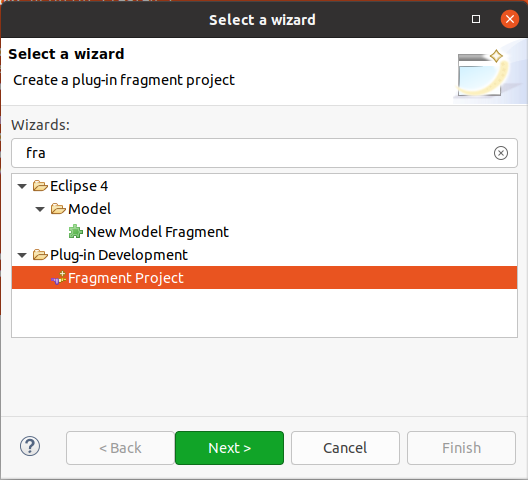
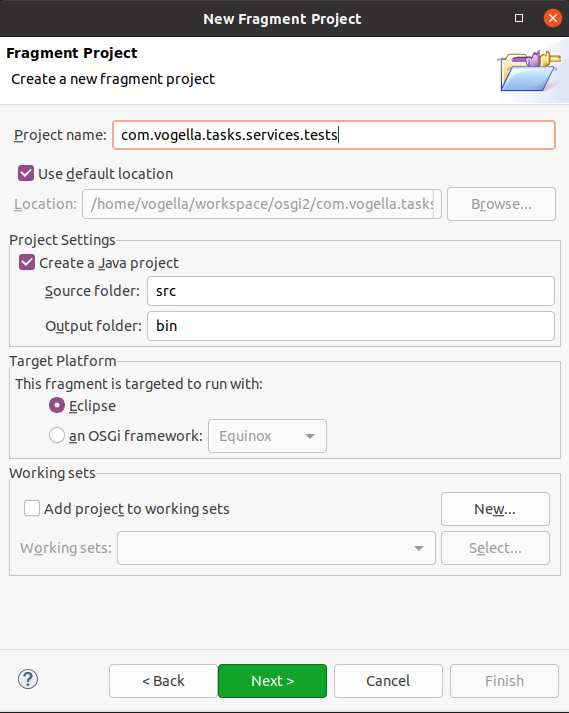
Enter com.vogella.tasks.services as host plug-in.
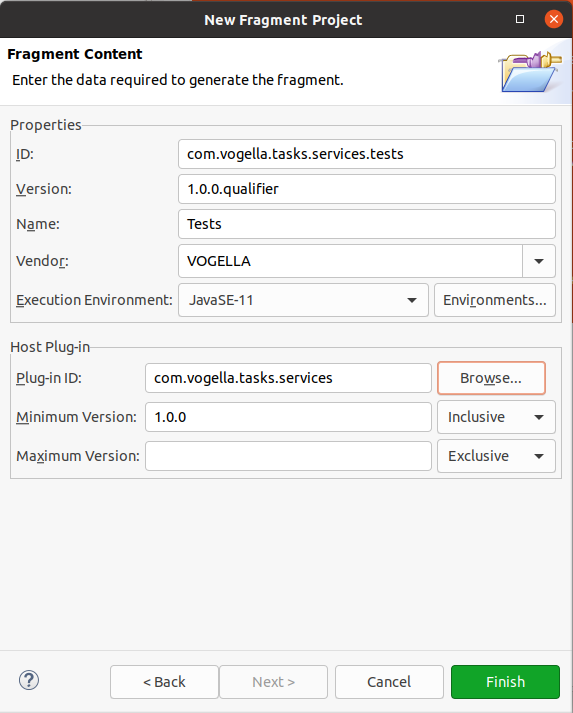
16.3. Update your manifest dependencies
Add the following plug-in dependencies to your test fragment.
-
junit.jupiter.api -
org.apache.felix.scr
|
OSGi promotes the usage of package dependencies to make the design more flexible. For the test, we use plug-in dependencies in this example to make the setup faster. |
16.4. Write a JUnit unit test
First you implement a unit test, without considering the OSGi environment.
Right-click on the project and select .
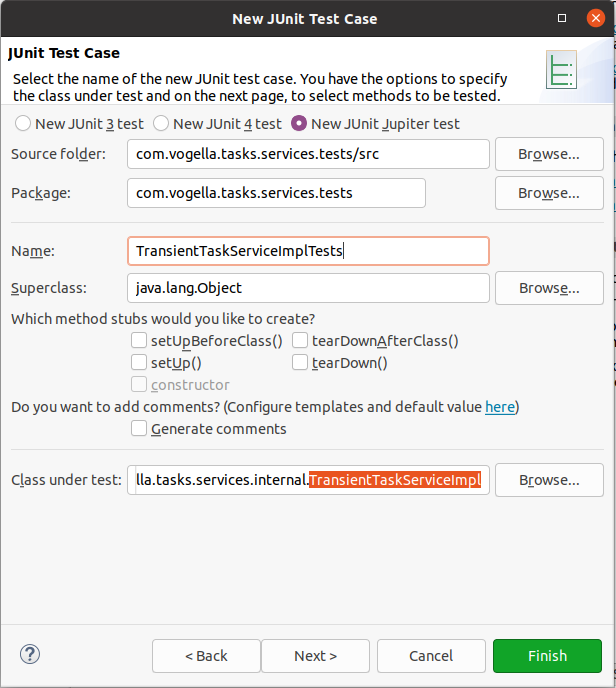
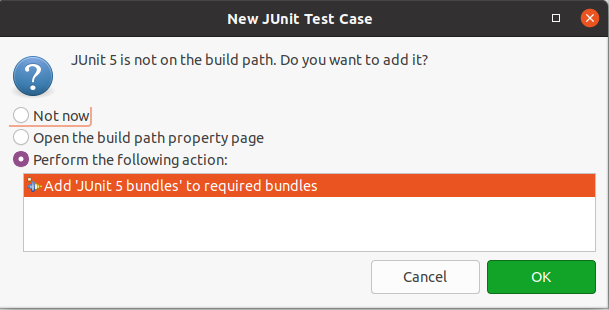
Also add JUnit 5 to your build path.
Implement the following class.
package com.vogella.tasks.services.tests;

import static org.junit.jupiter.api.Assertions.assertNotNull;
import static org.junit.jupiter.api.Assertions.assertTrue;

import org.junit.jupiter.api.DisplayName;
import org.junit.jupiter.api.Test;

import com.vogella.tasks.services.internal.TransientTaskServiceImpl;

class TransientTaskServiceImplTests {

    @Test
    @DisplayName("TransientTaskServiceImpl can be initialized")
    void assertThatTaskServiceCanBeInitialized() {
        TransientTaskServiceImpl service = new TransientTaskServiceImpl();
        assertNotNull(service);
        assertTrue(service.getAll().size()>0);
    }


    @Test
    @DisplayName("TransientTaskServiceImpl provides at least one task ")
    void assertThatTaskServiceProvidesData() {
        TransientTaskServiceImpl service = new TransientTaskServiceImpl();
        assertTrue(service.getAll().size()>0);
    }

}
16.5. Validate that the JUnit test executes
Right-click the test and select . The tests should both execute successfully.

16.6. Write an integration test considering the OSGi service environment
In the above test you did not use the OSGi service layer but initialized the service yourself. In the next test, you will test if the OSGi server layer correctly initialized the service. This is especially necessary if the services to test reference other services or OSGi features are used, like the EventAdmin for event processing or the ConfigurationAdmin to configure components at runtime.
Create the following unit test.
package com.vogella.tasks.services.tests;

import static org.junit.jupiter.api.Assertions.assertNotNull;
import static org.junit.jupiter.api.Assertions.assertTrue;

import org.junit.jupiter.api.Test;
import org.osgi.framework.Bundle;
import org.osgi.framework.FrameworkUtil;
import org.osgi.util.tracker.ServiceTracker;

import com.vogella.tasks.model.TaskService;

public class TransientTaskServiceIntegrationTest {

    @Test
    public void assertServiceAccessWithOSGiContextWorks() {
        TaskService taskService = getService(TaskService.class);
        assertNotNull(taskService, "No TaskService found");
    }

    static <T> T getService(Class<T> clazz) {
        Bundle bundle = FrameworkUtil.getBundle(TransientTaskServiceIntegrationTest.class);
        if (bundle != null) {
            ServiceTracker<T, T> st =
                new ServiceTracker<T, T>(
                    bundle.getBundleContext(), clazz, null);
            st.open();
            if (st != null) {
                try {
                    // give the runtime some time to startup
                    return st.waitForService(500);
                } catch (InterruptedException e) {
                    e.printStackTrace();
                }
            }
        }
        return null;
    }
}
16.6.1. Validate in the IDE
Right-click the test and select .
16.7. Add to the Tycho build
Add your test plug-in as module to an existing Tycho build. In case you are using pomless builds, this should allow to execute the tests on the command.
|
Maven Tycho support for JUnit 5 did show in the past sometimes issues. If you face such an issue, temporary disable the test and report to https://bugs.eclipse.org/bugs/enter_bug.cgi?product=Tycho |
The test plug-in should successfully execute the tests.
17. Using the OSGi service API
While the preferred way of defining and providing OSGi services is based on OSGi ds, you can also use OSGi API for this. This chapter describes this API, in case you need it.
17.1. Registering services via the BundleContext
A bundle can also register itself for the events(ServiceEvents) of the BundleContext.
These are, for example, triggered if a new bundle is installed or uninstalled or if a new service is registered.
To publish a service in your bundle use:
BundleContext bundleContext = FrameworkUtil.getBundle(this.getClass()).getBundleContext();
bundleContext.registerService(IMyService.class.getName(), new MzServiceImpl(), null);
Once the service is no longer used, you must deregister it with OSGi. OSGi counts the usage of services to enable the dynamic replacement of services. So once the service is no longer used by your implementation, unregister it. This is demonstrated by the following code:
context.ungetService(serviceReference);In the registerService() method from the BundleContext class you can specify arbitrary properties in the dictionary parameter.
You can use the getProperty() method of the ServiceReference class from the org.osgi.framework package, to access a specific property.
17.2. Accessing a service via API
A bundle can acquire a service via the BundleContext class.
The following code demonstrates this.
BundleContext bundleContext = FrameworkUtil.getBundle(this.getClass()).getBundleContext();
ServiceReference<?> serviceReference = bundleContext.getServiceReference(IMyService.class.getName());
IMyService service = (IMyService) bundleContext.getService(serviceReference);
17.3. Using an activator for service registration
|
Avoid using activators as they can slow down the startup of your application. |
A bundle can define a Bundle-Activator (Activator) in its declaration.
This class must implement the BundleActivator interface.
If defined, OSGi injects the BundleContext into the start() and stop() methods of the implementing Activator class.
import org.osgi.framework.BundleActivator;
import org.osgi.framework.BundleContext;


public class Activator implements BundleActivator {

    public void start(BundleContext context) throws Exception {
        System.out.println("Starting bundle");
        // do something with the context, e.g.,
        // register services
    }

    public void stop(BundleContext context) throws Exception {
        System.out.println("Stopping bundle");
        // do something with the context, e.g.,
        // unregister service
    }
}19. OSGi services resources
19.1. vogella Java example code
If you need more assistance we offer Online Training and Onsite training as well as consulting


